
Ever tried to run a VBS scripts that queries Active Directory in another domain or from a workstation that is not a domain member? Than you have probably seen this error before:

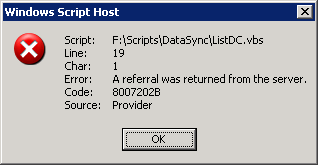
This is because the default settings for Chasing referrals is set to ADS_CHASE_REFERRALS_NEVER.
Add the line below to your script to make it work.
vb.net
Download
Const ADS_CHASE_REFERRALS_ALWAYS = &H60
objCommand.Properties("Chase referrals") = ADS_CHASE_REFERRALS_ALWAYS
So in a script it would look like this:
vb.net
Download
Const ADS_SCOPE_SUBTREE = 2
Const ADS_CHASE_REFERRALS_ALWAYS = &H60

Set objConnection = CreateObject("ADODB.Connection")
Set objCommand = CreateObject("ADODB.Command")
objConnection.Provider = "ADsDSOObject"
objConnection.Open "Active Directory Provider"
Set objCOmmand.ActiveConnection = objConnection
objCommand.Properties("Chase referrals") = ADS_CHASE_REFERRALS_ALWAYS

objCommand.CommandText = _
    "Select distinguishedName from " & _
        "'LDAP://cn=Configuration,DC=MyDomain,DC=Local' " _
            & "where objectClass='nTDSDSA'"
objCommand.Properties("Page Size") = 1000
objCommand.Properties("Searchscope") = ADS_SCOPE_SUBTREE

Set objRecordSet = objCommand.Execute
objRecordSet.MoveFirst

Do Until objRecordSet.EOF
    Wscript.Echo "Computer Name: " & _
        objRecordSet.Fields("distinguishedName").Value
    objRecordSet.MoveNext
Loop
Great hint!
I've searched a while to find a solution for this problem!
Dude, you rock! I have been struggling with this one for days and your solution nailed the problem!! Thanks.
Thanks for this hint
I was looking for a solution for this problem long !!
This was an excellent post. Thanks so much for the help.
I've been searching and searching for over 6 hours and you solved my problem!!! THANK YOU!
I've been really stuck with this problem. You really have dug me out of a very BIG hole. Many thanks for this post. Thank you
Thanks a lot it worked great
Thanks a lot, you save me much time!
Fantastic, it has been quite a while and this post is the only one talking about this on everything I have looked at. And yes, solved my problem! Thanks a lot!
I cannot thank you enough. I have been searching for a solution since a long time. Is it just me or MS really gives you all the information except the thing you are looking for? If they reverse the NOT condition in their searches, they will be as successful as google.