
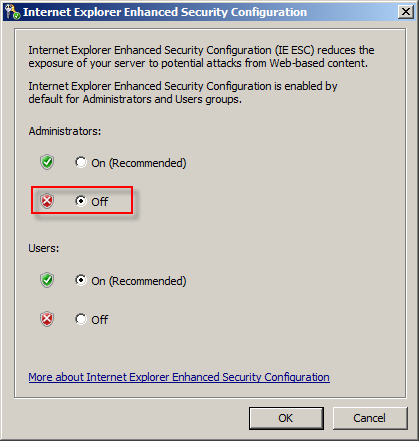
Open Server Manager and in the Security Information tab click Configure IE ESC. An improvement in Server 2008 is that you can disable it for Administators but enable it for Normal Users, this is nice for Terminal Server and Citrix environments.
Why. I write these posts in my own time, and I want to know which ones actually help: which get read to the end, where people give up halfway, and which topics bring readers from other sites. That decides what I write next, which old posts I update or fix, and where a follow-up is worth it.
What. When you leave a post, your browser sends one anonymous message: which post, how far down you got, how long the post was on your screen and how much of that you were actively reading, and which site linked you here. No cookie, no ID, no IP address, no device details, so visits can't be linked to you or to each other. Stored in the EU; only I see it.
Off means this browser sends nothing. Browsers that send Global Privacy Control or Do Not Track are excluded automatically. Privacy details
Open Server Manager and in the Security Information tab click Configure IE ESC. An improvement in Server 2008 is that you can disable it for Administators but enable it for Normal Users, this is nice for Terminal Server and Citrix environments.

In Win2008 there is a difference between "the Administrator" (Holy Grail) and a user that belongs to Administrator group. The master does not get UAC popups but the user does.
Does this dialog involve this fact?
Interesting question, I haven't tested much with normal user accounts on server 2008 yet. Does UAC make sense for non Administrators?
Yes it makes sense. UAC for non admin users shows a dialog that with an Administrator account predefined. You have to type the Admins passwort then.
Hi ,
But how do I open the "server manager"?Tell me the path to access that.Thanks in advance for the reply.
Warm regards
Syam
The Server Manager is in Administrative Tools.
It's also the first icon to the right of the Start button.