
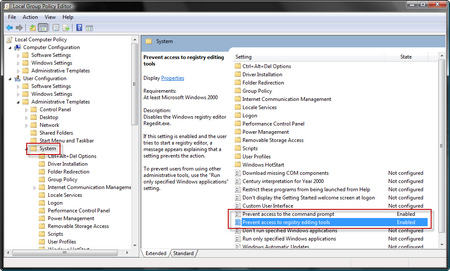
Most administrator will want to prevent normal users from opening Regedit and a command prompt. Usually this is done by activating the “Prevent access to registry editing tools” and “Prevent access to the command prompt” policy settings. They are located under User Configuration | Administrative Templates | System:
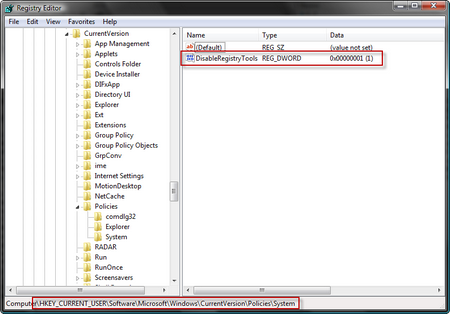
Activating the policies will set the matching keys in the registry:
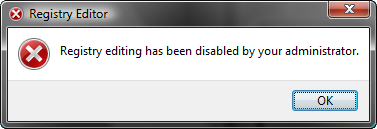
If we try to open regedit we are denied access:
So how does this work?
Actually regedit contains some code that checks these registry values and if the DWORD value is 1 access is denied.
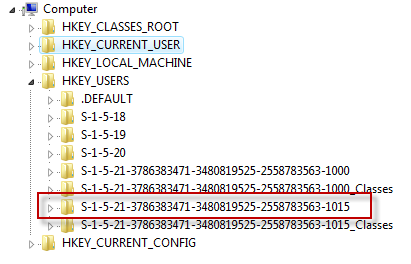
Sometimes you (the Administrator) want to check a specific registry setting when the user has a problem. We can offcourse do this by starting regedit with elevated permissions and browse to the user’s keys under HKEY_USERS. But this is inconvenient especially since the user’s registry is not shown under his/her username but the SID:
Wouldn’t it be nice to have a patched regedit.exe and a patched cmd.exe that ignore these policies?
Here’s your chance: PatchedTools.zip

Wow great news for me!
kindest regards
s!
[...] Related article(s): Registry editing has been disabled by your administrator (not anymore!) [...]
Wonderful patches - but I don't know how to do it to 64bit regedit and these tools crash!
Would be lovely if there was an updated set, thanks!
Yes I have the 64bit problem too these tools were excellent - I just hope we can find someone who can patch the new ones.