
If you look into the registry in the key HKLM\System\CurrentControlSet\ProductOptions you will find several licensing related Values.
The ProductType and ProductSuite keys contain the OS Suite and Edition, but the ProductPolicy key is much more interesting. So let’s have a closer look at it, open RegEdit and DoubleClick the key, you will something like the screenshot below, a Binary Value:
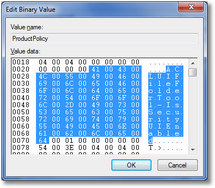
As you can see the license names are there as a Unicode string and later on I will show you how we can read the values. But because I didn’t want to extract all the names manually I decided to see if I could reverse the used structure because it didn’t look very complicated. Using a Hex Editor I could determine the important part of the structure.
It starts with a header:
  TProductPolicyHeader = packed record
    cbSize: DWORD;
    cbDataSize: DWORD;
    cbEndMarker: DWORD;
    Unknown1: DWORD;
    Unknown2: DWORD;
  end;
then an array of values follows:
  TProductPolicyValue = packed record
    cbSize: Word;
    cbName: Word;
    SlDatatype: Word;
    cbData: Word;
    Unknown1: DWORD;
    Unknown2: DWORD;
  end;
The SlDataType is a word value that corresponds to the values of the SLDATATYPE enum:
  _tagSLDATATYPE =
  (
    SL_DATA_NONE       = REG_NONE,
    SL_DATA_SZ         = REG_SZ,
    SL_DATA_DWORD      = REG_DWORD,
    SL_DATA_BINARY     = REG_BINARY,
    SL_DATA_MULTI_SZ   = REG_MULTI_SZ,
    SL_DATA_SUM        = 100
  );
  SLDATATYPE = _tagSLDATATYPE;
  TSlDataType = SLDATATYPE;
  PSlDataType = ^SLDATATYPE;
And we end with an End Marker (of size cbEndMarker).
Then I wrote some code to parse the structure:
procedure TForm1.ParseProductPolicy;
const
  KeyName = 'SYSTEM\CurrentControlSet\Control\ProductOptions';
  ValueName = 'ProductPolicy';
var
  HourGlass: IHourGlass;
  ms: TMemoryStream;
  Reg: TRegistry;
  CurPos: Int64;
  Header: TProductPolicyHeader;
  Value: TProductPolicyValue;
  Name: UnicodeString;
begin
  HourGlass := TIHourGlass.Create;
  ms := TMemoryStream.Create;
  try
    ListView1.Items.BeginUpdate;
    Reg := TRegistry.Create;
    try
      Reg.RootKey := HKEY_LOCAL_MACHINE;
      {  Open  ProductOptions Key }
      if Reg.OpenKeyReadOnly(KeyName) then
      begin
        { Get ProductPolicy Size }
        ms.Size := Reg.GetDataSize(ValueName);
        if ms.Size > 0 then
        begin
          { Read ProductPolicy Data into MemoryStream }
          Reg.ReadBinaryData(ValueName, ms.Memory^, ms.Size);
        end;
      end;
    finally
      Reg.Free;
    end;

    { Read Header }
    ms.ReadBuffer(Header, SizeOf(Header));

    { Loop through the Values }
    while ms.Size - Header.cbEndMarker > ms.Position do
    begin
      { Store current position }
      CurPos := ms.Position;

      { Read Value }
      ms.ReadBuffer(Value, SizeOf(Value));
      { Set Name length }
      SetLength(Name, Value.cbName div SizeOf(WChar));
      { Read Name }
      ms.ReadBuffer(Name[1], Value.cbName);

      { Read License Value }
      CheckValue(Name);

      { Jump to next Value }
      ms.Seek(CurPos + Value.cbSize, soFromBeginning);
    end;

  finally
    ListView1.Items.EndUpdate;
    ms.Free;
  end;

end;
The procedure that reads the actual value is CheckValue, it uses the SLGetWindowsInformation function:
function SLGetWindowsInformation(pwszValueName: PWideChar;
  var peDataType: SLDATATYPE; var pcbValue: UINT; var ppbValue: PByte): HRESULT;
  stdcall; external 'slc.dll';
The results are very interesting, I didn’t know there were so many licensable features in Windows!
You can check your results with the demo project (source included).
LicenseDemo.rar
Here are the results from my Windows 7 Laptop: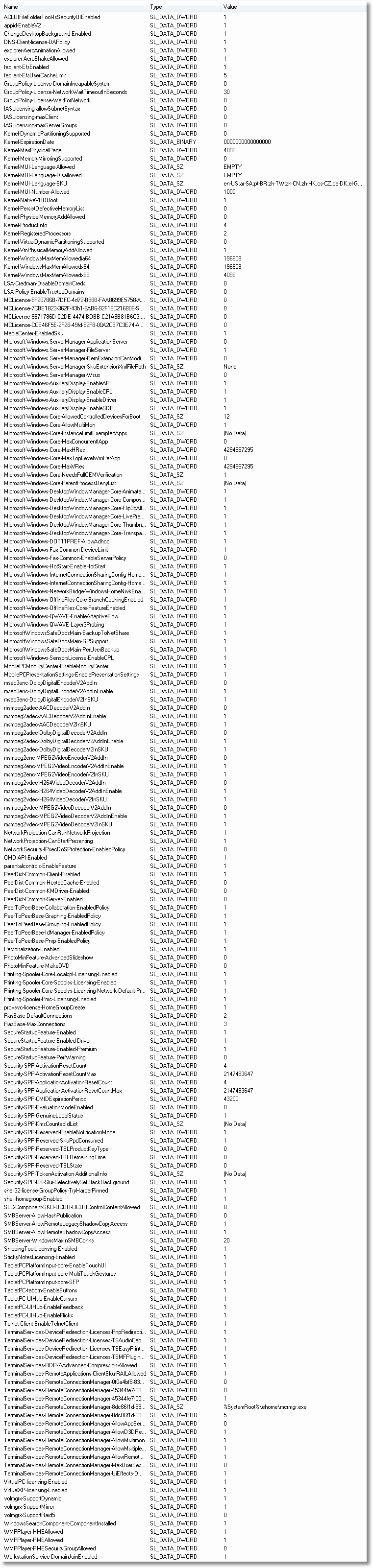

Hi,
Nice tool, although it doesn't work 100% on my Windows 7 (Ultimate), specially not with dualscreen. I can't move it on my screen and it is stuck between my two monitors (screenshot added on bottom). I can't close the application either, I have to end the process to close it.
Screenshot: http://www.imgdumper.nl/uploads3/4c18efa1d889f/4c18efa1bb3da-Untitled.png
Grtz,
Hans
Oh oh Hans, shame on me: I inserted a messagebox displaying all values so I could easily copy them to the clipboard but forgot to remove it.
So what you are seeing is a messagebox with 185 lines or so :P
I have updated the download.
[...] can directly check this value with the Licensing Demo from my Having fun with Windows Licensing [...]
[...] information about how to read the Product Options is available here. Share this:TwitterFacebookReddit This entry was posted in Uncategorized and tagged boot, [...]
[...] Some information about how to read the Product Options is available here. [...]