
I wanted to query the full path name of an Altiris Job, this sounds easier that it is though.
Consider the following hierarchy:
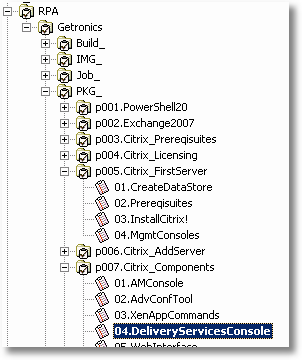
Now I want to assemble the full Path, in this case: RPA\Getronics\PKG_p007.Citrix_Components.
This is important because I want to automatically create the corresponding directory structure which would be: \SERVER\eXpress\RPA\Getronics\PKG_p007.Citrix_Components.
Altiris stores the Job (04.DeliveryServicesConsole) in the events table and in this table is a column folder_id. We can then lookup this folder_id in the event_folder table where each folder_id has a parent_id (which can be null in case of a root folder).
So we need to traverse the tree from the bottom up until we find the root folder. SQL Server has a mechanism for recursive queries called Common Table Expressions.
Using this mechanism I made the following query:
WITH t1 (folder_id, name, parent_id, level)
AS
(
-- Anchor member definition
	SELECT folder_id, name, parent_id, 0 AS Level
	FROM event_folder
	WHERE folder_id in (
		SELECT folder_id FROM event WHERE event_id = 2000112)
	UNION ALL

-- Recursive member definition
	SELECT t2.folder_id,t2.name, t2.parent_id, Level+1
	FROM event_folder AS t2, t1
	WHERE t2.folder_id = t1.parent_id
)

-- Statement that executes the CTE
-- STUFF and FOR XML are used to Concatenate the Values and seperate them by \ character
SELECT STUFF((SELECT '\' + name from t1 order by level desc FOR XML PATH('')),1,1,'')
The output is: RPA\Getronics\PKG_\p007.Citrix_Components
I added the Level column to be able to sort on it (descending) to get the proper path order, else it would have been p007.Citrix_Components\PKG_\Getronics\RPA.
Next steps are to prepend the \SERVER\eXpress part and make the query parameterised so I can call it from within a job using the %JOBID% token.
To be continued…

[...] I described a SQL Query to get the Full Path of an Altiris Job, today I will describe how we can make a User Defined Function (UDF) in SQL so we can call it [...]