
Last week I needed to an unattended installation of the Oracle Client, in my case version 10.2.0.1.0.
Oracle has a record switch that allows you to record an installation and generate a response file using: setup -record -destinationFile response_file_name. This is documented here.
When you are finished you can use this response file to perform the unattended install, eg setup -silent -responseFile response_file_name.
There is a problem though, the installer (setup.exe) launches a java based installer and immediately returns.
This was a problem for me since I cannot deploy a dependant application if the Oracle install hasn’t finished yet.
I did some googling and found a lot of questions about this subject and saw a common resolution where a script is watching a certain file that is creating when the installation has finished in a loop.
I figured there should be a better wait so I to a closer look at the installer with Ida Pro. I noticed that setup.exe launches another exe. called oui.exe (Oracle Universal Installer) which in turn launches Java.
I also noticed that oui.exe waits for the install to finish using the MsgWaitForMultipleObjects function if a certain variable is True:
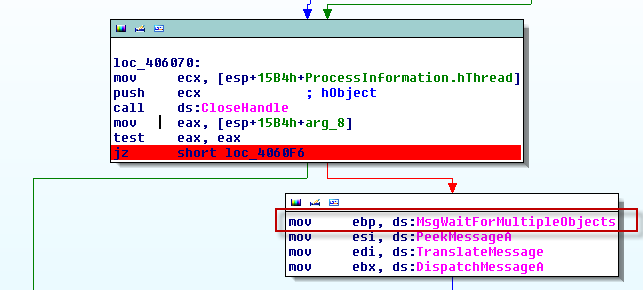
It turns out that if we launch oui.exe using start /w instead of setup.exe and pass the switch -WAITFORCOMPLETION the installer will not return until it has finished.
This is my complete job:
rem Install Oracle 10.2 Client

set JOBFOLDER=%#*"SELECT dbo.GetActiveFullPath(%ID%)"%
if not exist %JOBFOLDER% MD %JOBFOLDER%

set InstallPath=%SRCPATH%\Oracle

rem Jump to the Directory of this Job (you can write logfiles there)
pushd "%JOBFOLDER%

rem Start Script Here
start /w %InstallPath%\Install\oui.exe -WAITFORCOMPLETION -nowait -silent -responsefile %InstallPath%\response\oracle.rsp

rem Save ErrorLevel
set ret=%errorlevel%
del "D:\Apps\oracle\product\10.2.0\client_1\NETWORK\ADMIN\sqlnet.ora" /F /Q
reg add "HKLM\SOFTWARE\ORACLE\KEY_OraClient10g_home1" /v "TNS_ADMIN" /t REG_SZ /d "\\ADNRD01\Apps\Oracle\tns_admin" /f

rem Script End
:EXIT

rem Return to Start Directory
popd

rem Exit and return Saved ErrorLevel
exit %ret%
Thanks very much for this post. I also needed to wait for the Oracle installation to complete, and using oui.exe and -WAITFORCOMPLETION worked perfectly.
Small piece of information but very valuable for me ! Many thanks !