
If you are implementing a Citrix, Terminal Server or even just a plain Client-Server environment you will need to create a Default User Profile at some point.
The Default User Profile can be thought of as the initial registry settings that are used when a new profile is created.
Many people think that the Default User Profile is available in regedit via HKEY_USERS.Default but this is NOT the Default User Profile.
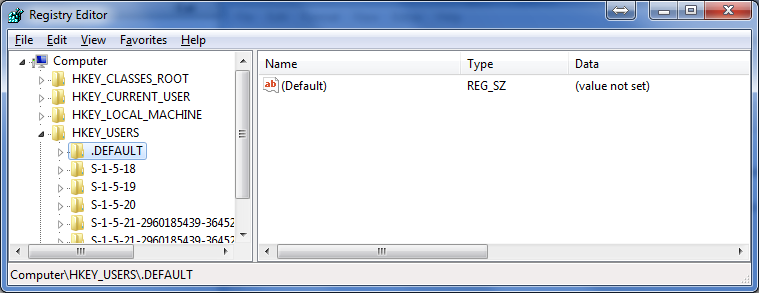
The .Default key is loaded before you logon, so it’s usefull to save the language and keyboard settings that apply before logging on. Many OEM vendors also set a background image here to set a “logon wallpaper”.
The location of the Default User Profile is set in the registry under HKLM\Software\Microsoft\Windows NT\CurrentVersion\ProfileList:
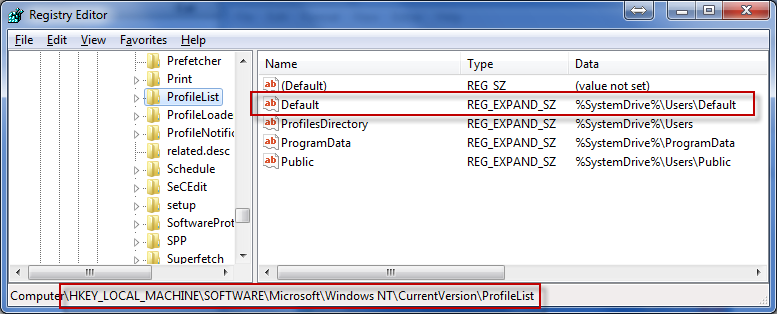
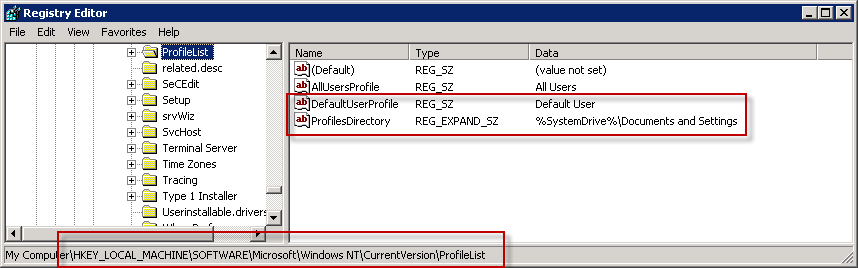
Note that on Windows Vista and higher OS the Default key containts the full path but on Windows 2003/XP you need to assemble the path by combining the values of ProfilesDirectory and DefaultUserProfile:
But how do we create a Default User Profile?
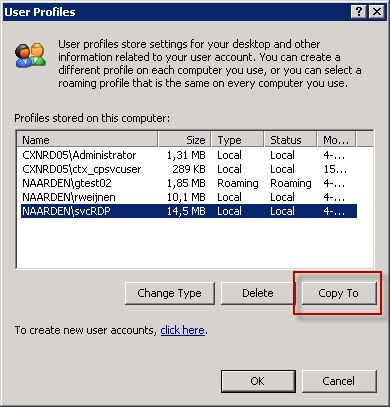
The traditional method is that you logon as a certain user, make you changes and the copy the profile using the Copy To button in the User Profiles page of the Advanced System Properties:
However this is a lot of manual work that you need to do all over again if you go to a new OS of even another environment (especially if you move on from project to project like me).
Note that you can of course copy the Default User Profile from one machine to another but you can’t keep track of changes or easily see the contents.
That’s why I use another way: I create .reg files with all the Default Settings I need.
I use a little know feature of reg files: you can add comments using the semi colon (;)
You can also deletee keys or values in .reg files using the minus sign (-).
In the .reg file I use HKEY_USERS#DefUser to reference HKEY_CURRENT_USER.
A typical Default User Profile .reg file looks like this:
Windows Registry Editor Version 5.00

; This file adds Default settings to the Default user profile
; Author: Remko Weijnen (r dot weijnen at gmail.com)
;
; v0.3 13-10-2009 Adjustments for 2008

; V0.2 30-09-2008 Modifications:
; Disable Printer Notifications
;[HKEY_USERS\#DefUser\Printers\Settings]
;"EnableBalloonNotificationsRemote"=dword:00000000


[HKEY_USERS\#DefUser]

; MUI
[HKEY_USERS\#DefUser\Control Panel\Desktop]
"MUILanguagePending"="00000413"
"MultiUILanguageId"="00000413"

; Regional Settings (Dutch, Netherlands)
[HKEY_USERS\#DefUser\Control Panel\International]
"iCountry"="31"
"iCurrDigits"="2"
"iCurrency"="2"
"iDate"="1"
"iDigits"="2"
"iLZero"="1"
"iMeasure"="0"
"iNegCurr"="11"
"iTime"="1"
"iTLZero"="0"
"Locale"="00000413"
"s1159"=""
"s2359"=""
"sCountry"="Netherlands"
"sCurrency"="╟"
"sDate"="-"
"sDecimal"=","
"sLanguage"="NLD"
"sList"=";"
"sLongDate"="dddd d MMMM yyyy"
"sShortDate"="d-M-yyyy"
"sThousand"="."
"sTime"=":"
"DefaultBlindDialFlag"=hex:00
"sTimeFormat"="H:mm:ss"
"iTimePrefix"="0"
"sMonDecimalSep"=","
"sMonThousandSep"="."
"iNegNumber"="1"
"sNativeDigits"="0123456789"
"NumShape"="1"
"iCalendarType"="1"
"iFirstDayOfWeek"="0"
"iFirstWeekOfYear"="2"
"sGrouping"="3;0"
"sMonGrouping"="3;0"
"sPositiveSign"=""
"sNegativeSign"="-"


; Regional and Language Options | Location
[HKEY_USERS\#DefUser\Control Panel\International\Geo]
"Nation"="176"

[HKEY_USERS\#DefUser\Keyboard Layout]

[HKEY_USERS\#DefUser\Keyboard Layout\IMEtoggle]

[HKEY_USERS\#DefUser\Keyboard Layout\IMEtoggle\scancode]

; Remove existing
[-HKEY_USERS\#DefUser\Keyboard Layout\Preload]

; Language Dutch
[HKEY_USERS\#DefUser\Keyboard Layout\Preload]
"1"="00000413"

; Remove existing
[-HKEY_USERS\#DefUser\Keyboard Layout\Substitutes]

; Dutch Language but US International Keyboard!
[HKEY_USERS\#DefUser\Keyboard Layout\Substitutes]
"00000413"="00020409"

[HKEY_USERS\#DefUser\Keyboard Layout\Toggle]
"Hotkey"="3"
"Language Hotkey"="3"
"Layout Hotkey"="3"

; Disable Printer Notifications
[HKEY_USERS\#DefUser\Printers\Settings]
"EnableBalloonNotificationsRemote"=dword:00000000

[HKEY_USERS\#DefUser\Software]

[HKEY_USERS\#DefUser\Software\Microsoft]

[HKEY_USERS\#DefUser\Software\Microsoft\Clock]
"iFormat"="1"

[HKEY_USERS\#DefUser\Software\Microsoft\CTF]
"Disable Thread Input Manager"=dword:00000001

[HKEY_USERS\#DefUser\Software\Microsoft\CTF\Assemblies]

[HKEY_USERS\#DefUser\Software\Microsoft\CTF\Compartment]

[HKEY_USERS\#DefUser\Software\Microsoft\CTF\LangBar]
"ExtraIconsOnMinimized"=dword:00000001
"ShowStatus"=dword:00000004
"Transparency"=dword:000000ff
"Label"=dword:00000001

[HKEY_USERS\#DefUser\Software\Microsoft\CTF\MSUTB]
"Left"=dword:000003ca
"Top"=dword:00000000
"Vertical"=dword:00000000

[HKEY_USERS\#DefUser\Software\Microsoft\CTF\Sapilayr]
"ProfileInitialized"=dword:00000001

[HKEY_USERS\#DefUser\Software\Microsoft\CTF\TIP]

[HKEY_USERS\#DefUser\Software\Microsoft\CTF\TIP\{DCBD6FA8-032F-11D3-B5B1-00C04FC324A1}]

[HKEY_USERS\#DefUser\Software\Microsoft\CTF\TIP\{DCBD6FA8-032F-11D3-B5B1-00C04FC324A1}\LanguageProfile]

[HKEY_USERS\#DefUser\Software\Microsoft\CTF\TIP\{DCBD6FA8-032F-11D3-B5B1-00C04FC324A1}\LanguageProfile\0x00000409]

[HKEY_USERS\#DefUser\Software\Microsoft\CTF\TIP\{DCBD6FA8-032F-11D3-B5B1-00C04FC324A1}\LanguageProfile\0x00000409\{09EA4E4B-46CE-4469-B450-0DE76A435BBB}]
"Enable"=dword:00000000

[HKEY_USERS\#DefUser\Software\Microsoft\CTF\TIP\{DCBD6FA8-032F-11D3-B5B1-00C04FC324A1}\LanguageProfile\0x00000413]

[HKEY_USERS\#DefUser\Software\Microsoft\CTF\TIP\{DCBD6FA8-032F-11D3-B5B1-00C04FC324A1}\LanguageProfile\0x00000413\{09EA4E4B-46CE-4469-B450-0DE76A435BBB}]
"Enable"=dword:00000000

; Reuse windows for launching shortcuts
[HKEY_USERS\#DefUser\Software\Microsoft\Internet Explorer\Main]
"AlwaysShowMenus"=dword:00000001
"AllowWindowReuse"=dword:00000000

[HKEY_USERS\#DefUser\Software\Microsoft\Internet Explorer\Main\FeatureControl]

; Allow active content to run in files on My Computer
[HKEY_USERS\#DefUser\Software\Microsoft\Internet Explorer\Main\FeatureControl\FEATURE_LOCALMACHINE_LOCKDOWN]
"iexplore.exe"=dword:00000000

; Allow active content to run from CDs to run on My Computer
[HKEY_USERS\#DefUser\Software\Microsoft\Internet Explorer\Main\FeatureControl\FEATURE_LOCALMACHINE_LOCKDOWN\Settings]
"LOCALMACHINE_CD_UNLOCK"=dword:00000001

; Phishing filter
[HKEY_USERS\#DefUser\Software\Microsoft\Internet Explorer\PhishingFilter]
"Enabled"=dword:00000000

; Open Server Manager at logon
[HKEY_USERS\#DefUser\Software\Microsoft\ServerManager]
"DoNotOpenServerManagerAtLogon"=dword:00000001

; Office UI Language
[HKEY_USERS\#DefUser\Software\Microsoft\Shared]
"OfficeUILanguage"=dword:00000413


[HKEY_USERS\#DefUser\Software\Microsoft\Windows]

[HKEY_USERS\#DefUser\Software\Microsoft\Windows\CurrentVersion]

[HKEY_USERS\#DefUser\Software\Microsoft\Windows\CurrentVersion\Controls Folder]
"Presentation LCID"=dword:00000409

[HKEY_USERS\#DefUser\Software\Microsoft\Windows\CurrentVersion\Explorer]

; Shell settings (4th bit from the right: 0 = Classic Start Menu, 2 = New Start Menu)
[HKEY_USERS\#DefUser\Software\Microsoft\Windows\CurrentVersion\Explorer]
"ShellState"=hex:24,00,00,00,33,08,00,00,00,00,00,00,00,00,00,00,00,00,00,00,\
  01,00,00,00,0d,00,00,00,00,00,00,00,00,00,00,00

[HKEY_USERS\#DefUser\Software\Microsoft\Windows\CurrentVersion\Explorer\Advanced]
"WebViewBarricade"=dword:00000001
"Start_ShowControlPanel"=dword:00000002
"Start_AdminToolsRoot"=dword:00000002
"StartMenuAdminTools"="NO"
"Start_ShowMyDocs"=dword:00000000
"Start_ShowRecentDocs"=dword:00000000
"Start_ShowNetPlaces"=dword:00000000
"Start_ShowPrinters"=dword:00000001
"Hidden"=dword:00000000
"HideFileExt"=dword:00000001
"ServerAdminUI"=dword:00000001
"ShowCompColor"=dword:00000001
"DontPrettyPath"=dword:00000000
"ShowInfoTip"=dword:00000001
"HideIcons"=dword:00000000
"MapNetDrvBtn"=dword:00000000
"WebView"=dword:00000000
"Filter"=dword:00000000
"SuperHidden"=dword:00000001
"SeparateProcess"=dword:00000000
"StartMenuInit"=dword:00000002
"StartButtonBalloonTip"=dword:00000002
"TaskbarSizeMove"=dword:00000000
"TaskbarGlomming"=dword:00000000
"StartMenuFavorites"=dword:00000000
"StartMenuLogoff"=dword:00000001
"StartMenuRun"=dword:00000001
"StartMenuChange"=dword:00000001
"CascadeControlPanel"="NO"
"CascadeMyDocuments"="NO"
"CascadeMyPictures"="NO"
"CascadeNetworkConnections"="NO"
"CascadePrinters"="NO"
"StartMenuScrollPrograms"="NO"
"IntelliMenus"=dword:00000000
"ListviewAlphaSelect"=dword:00000000
"TaskbarAnimations"=dword:00000000
"ListviewWatermark"=dword:00000000
"ListviewShadow"=dword:00000000
"ShowSuperHidden"=dword:00000000

; Desktop Icons (New Start Menu)
[HKEY_USERS\#DefUser\Software\Microsoft\Windows\CurrentVersion\Explorer\HideDesktopIcons\NewStartPanel]
; Documents Folder:
"{59031a47-3f72-44a7-89c5-5595fe6b30ee}"=dword:00000001
; My Computer:
"{20D04FE0-3AEA-1069-A2D8-08002B30309D}"=dword:00000000
; Network:
"{F02C1A0D-BE21-4350-88B0-7367FC96EF3C}"=dword:00000000
; Recycle Bin:
"{F02C1A0D-BE21-4350-88B0-7367FC96EF3C}"=dword:00000000
; Control Panel
"{5399E694-6CE5-4D6C-8FCE-1D8870FDCBA0}"=dword:00000001

; This contains ao Taskbar settings (bit 9 controls the clock)
[HKEY_USERS\#DefUser\Software\Microsoft\Windows\CurrentVersion\Explorer\StuckRects2]
"Settings"=hex:28,00,00,00,ff,ff,ff,ff,02,00,00,00,03,00,00,00,3c,00,00,00,1e,\
  00,00,00,fe,ff,ff,ff,e4,02,00,00,02,04,00,00,02,03,00,00

; Empty the Pinned Items list in the Start menu (Vista/2008 with New Start menu)
[HKEY_USERS\#DefUser\Software\Microsoft\Windows\CurrentVersion\Explorer\StartPage]
"Favorites"=hex:ff

; Visuals Effects | Best Performance
[HKEY_USERS\#DefUser\Software\Microsoft\Windows\CurrentVersion\Explorer\VisualEffects]
"VisualFXSetting"=dword:00000002

[HKEY_USERS\#DefUser\Software\Microsoft\Windows\CurrentVersion\Explorer\VisualEffects\AnimateMinMax]

[HKEY_USERS\#DefUser\Software\Microsoft\Windows\CurrentVersion\Explorer\VisualEffects\ComboBoxAnimation]

[HKEY_USERS\#DefUser\Software\Microsoft\Windows\CurrentVersion\Explorer\VisualEffects\CursorShadow]

[HKEY_USERS\#DefUser\Software\Microsoft\Windows\CurrentVersion\Explorer\VisualEffects\DragFullWindows]

[HKEY_USERS\#DefUser\Software\Microsoft\Windows\CurrentVersion\Explorer\VisualEffects\DropShadow]

[HKEY_USERS\#DefUser\Software\Microsoft\Windows\CurrentVersion\Explorer\VisualEffects\FontSmoothing]

[HKEY_USERS\#DefUser\Software\Microsoft\Windows\CurrentVersion\Explorer\VisualEffects\ListBoxSmoothScrolling]

[HKEY_USERS\#DefUser\Software\Microsoft\Windows\CurrentVersion\Explorer\VisualEffects\ListviewAlphaSelect]

[HKEY_USERS\#DefUser\Software\Microsoft\Windows\CurrentVersion\Explorer\VisualEffects\ListviewShadow]

[HKEY_USERS\#DefUser\Software\Microsoft\Windows\CurrentVersion\Explorer\VisualEffects\ListviewWatermark]

[HKEY_USERS\#DefUser\Software\Microsoft\Windows\CurrentVersion\Explorer\VisualEffects\MenuAnimation]

[HKEY_USERS\#DefUser\Software\Microsoft\Windows\CurrentVersion\Explorer\VisualEffects\SelectionFade]

[HKEY_USERS\#DefUser\Software\Microsoft\Windows\CurrentVersion\Explorer\VisualEffects\TaskbarAnimations]

[HKEY_USERS\#DefUser\Software\Microsoft\Windows\CurrentVersion\Explorer\VisualEffects\Themes]

[HKEY_USERS\#DefUser\Software\Microsoft\Windows\CurrentVersion\Explorer\VisualEffects\TooltipAnimation]

[HKEY_USERS\#DefUser\Software\Microsoft\Windows\CurrentVersion\Explorer\VisualEffects\WebView]

; Change nr of property bags that are remembered (Remember Folder View settings per folder)
[HKEY_USERS\#DefUser\Software\Microsoft\Windows\ShellNoRoam]
"BagMRU Size"=dword:00001F40

[HKEY_USERS\#DefUser\Software\Microsoft\Windows\ShellNoRoam\Bags]

[HKEY_USERS\#DefUser\Software\Microsoft\Windows\ShellNoRoam\Bags\All Folders]

; Force default explorer view to Details (mode = 4)
[HKEY_USERS\#DefUser\Software\Microsoft\Windows\ShellNoRoam\Bags\All Folders\Shell]
"Mode"=dword:00000004
"WFlags"=dword:00000000
"Status"=dword:00000001
"Address"=dword:ffffffff
"Vid"="{137E7700-3573-11CF-AE69-08002B2E1262}"

; Disable the Welcome wizard for Administrators
[HKEY_USERS\#DefUser\Software\Microsoft\Windows NT\CurrentVersion\Setup\Welcome]
"srvwiz"=dword:00000000
I have created a vbscript that mounts the Default User Profile (under HKEY_USERS#DefUser), imports the regfile (given as parameter) and unmounts the key again.
Script and sample .reg file are available in the download below!

[...] Dit blogartikel was vermeld op Twitter door Michel Roth. Michel Roth heeft gezegd: Great, real-life solution to manage the Default User Profile via a script: http://bit.ly/e8WSAy [...]
how we will use this reg file?
Use the scripts that are included in the download!
I do the change with one of the profile. Now the computer make the grinding noise all the time. How do make go away please?
[...] Link [...]