
In my previous post I explained how to get the recursive group membership with a very simple Powershell Script.
Commenter Michel thought that the script only tested one level deep but it doesn’t.
But let’s prove that!
Create 3 Global Groups in your Active Directory and name them Level1, 2 and 3:

Make Level3 a Member of Level 2 and make Level a member of Level 1 and finally add an account to the Level 3 group:
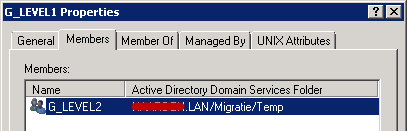
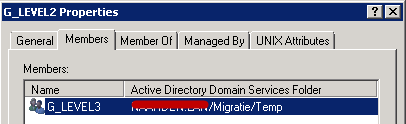
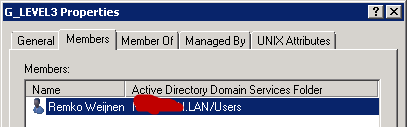
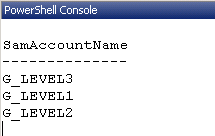
Now run the script and the output should include all 3 groups:
powershell
Download
Add-Type -AssemblyName System.DirectoryServices.AccountManagement
$ct = [System.DirectoryServices.AccountManagement.ContextType]::Domain

$user = [System.DirectoryServices.AccountManagement.UserPrincipal]::Current
$groups = $user.GetAuthorizationGroups() | where {$_ -like "G_LEVEL*"} | select SamAccountName
foreach ($group in $groups)
{
	$group
}
And the Output:

Still can't get it to work.
Had to change it slightly for my environment, ie I wanted all the recursive groups so missed out the WHERE clause:
Add-Type -AssemblyName System.DirectoryServices.AccountManagement
$ct = [System.DirectoryServices.AccountManagement.ContextType]::Domain
$user = [System.DirectoryServices.AccountManagement.UserPrincipal]::Current
$groups = $user.GetAuthorizationGroups() | select SamAccountName
foreach ($group in $groups)
{
$group
}
@Simon: what is the error?