
In my previous post I wrote about a problem I had with duplicate RID Allocation pools.
But how do we get more insight into these RID Allocation pools?
The DCDIAG tool can display this information per domain controleler using the following syntax
dcdiag /s:server /v /test:ridmanagerExample output:

But where in Active Directory is this information stored and can we display it for all Domain Controllers at once for larger environments?
Let's start with the Active Directory part, the System container has an object named RID Manager$:
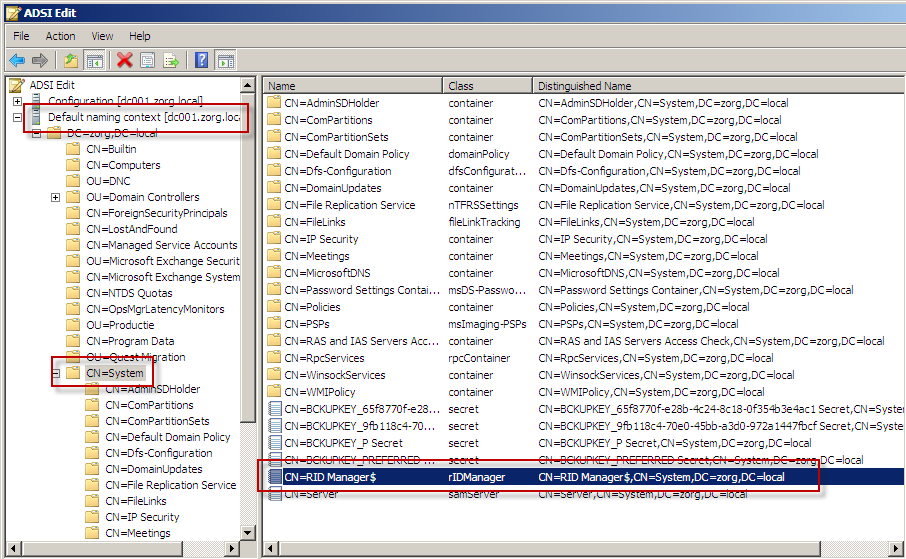
The fSMORoleOwner attribute holds the RID Master FSMO role owner.
rIDAvailablePool is a Large Integer (an 8 byte value) where the lower 4 bytes are the From (Beginning of next RID pool to be allocated) and the higher 4 bytes are the To (Total number of RIDS that can be created in a domain) as displayed by dcdiag.
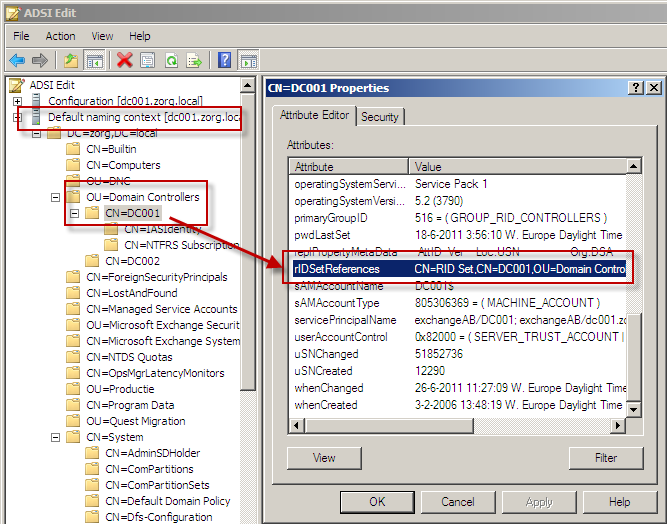
The Allocation Pools and the Next RID are kept by each server in a child object called RID Set. We can find the RID Set by querying the rIDSetReferences attribute which contains the LDAP path to the RID Set:
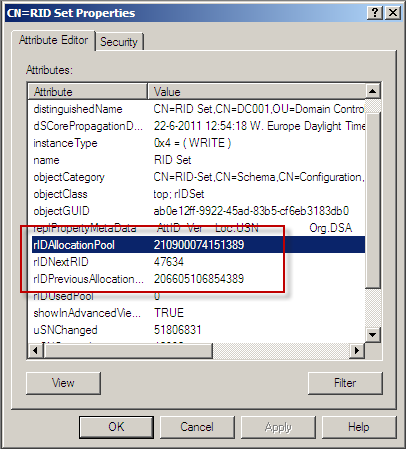
The RID Set contains the other values we are looking for where rIDAllocationpool (the pool currently in use) and rIDPreviousAllocationpool (the pool that will be used next when the current pool is exhausted) are again Large Integers with a Low and a High part:
Now that we know where the values are stored we can write a script, I have chosen PowerShell.
First we connect to the (Default) domain and obtain the distinguishedName of the domain (DC=MyDomain, DC=local).
# Bind to domain
$objDomain = New-Object System.DirectoryServices.DirectoryEntry
Write-Host "Domain:" $objDomain.distinguishedName
Write-Host "Netbios name:" $objDomain.name
Now we can open RID Manager Object:
# Open the RID Manager Object
$strRidManager = [String]::Concat("LDAP://CN=RID Manager$,CN=System,", $objDomain.distinguishedName)
$objRidManager = New-Object System.DirectoryServices.DirectoryEntry($strRidManager)
And query for the FSMO Role Owner:
# Check FSMO Role Owner
$objRidMaster = New-Object System.DirectoryServices.DirectoryEntry("LDAP://" + $objRidManager.FsmoRoleOwner)
$objRidMaster = New-Object System.DirectoryServices.DirectoryEntry($objRidMaster.Parent)
Write-Host "RID Master:" $objRidMaster.name
From the RID Master we read the rIDAvailablePool attribute:
# Read Available RID Pool
$objAvailPool = GetInteger8 $objRidManager.rIDAvailablePool
Write-Host "RidAvailablePool: from" $objAvailPool.LowPart "to" $objAvailPool.Highpart
GetInteger8 is a helper function to read Integer8 (Large Integer) values from Active Directory:
# This functions read an Integer8 Value from Active Directory and returns an object
# with LowPart and Highpart properties
function GetInteger8([Object] $Integer8)
{
	$gp = [Reflection.Bindingflags]::GetProperty
	$objType = $Integer8.GetType()
	$objValue = $objType.InvokeMember("Value", $gp, $null, $Integer8, $null)
	$objType = $objValue.GetType()

	$return = New-Object -TypeName System.Object

	$return | Add-Member -MemberType NoteProperty -Name LowPart -Value $objType.InvokeMember("LowPart", $gp, $null, $objValue, $null)
	$return | Add-Member -MemberType NoteProperty -Name HighPart -Value $objType.InvokeMember("HighPart", $gp, $null, $objValue, $null)

	return $return
}
We are going to store all RID Data in an array so we can use the Format options from PowerShell:
# Create array to store RID Data
$RidDataSet = @()
I wrote a function to gather and return the RID Data for a Domain Controller object:
# Note that you need to bind to the domain controller you want data from
function GetRidData([System.DirectoryServices.DirectoryEntry] $RidSet)
{
	$objParent = New-Object System.DirectoryServices.DirectoryEntry($RidSet.Parent)
	[string]$dcName = $objParent.Name

	$return = New-Object -TypeName System.Object
	# Domain Controller (Netbios) name
	$return | Add-Member -MemberType NoteProperty -Name DC -Value $dcName

	# rIDAllocationPool is a 64 bit value, the lowpart being the From and the highpart the To
	$AllocPool = GetInteger8 $RidSet.rIDAllocationPool
	$return | Add-Member -MemberType NoteProperty -Name rIDAllocationPoolFrom -Value $AllocPool.LowPart
	$return | Add-Member -MemberType NoteProperty -Name rIDAllocationPoolTo -Value $AllocPool.HighPart

	# rIDPreviousPool is a 64 bit value, the lowpart being the From and the highpart the To
	$PrevPool = GetInteger8 $RidSet.rIDPreviousAllocationPool
	$return | Add-Member -MemberType NoteProperty -Name rIDPreviousAllocationPoolFrom -Value $PrevPool.LowPart
	$return | Add-Member -MemberType NoteProperty -Name rIDPreviousAllocationPoolTo -Value $PrevPool.HighPart

	# rIDPreviousPool is an array with a single value
	$return | Add-Member -MemberType NoteProperty -Name rIDNextRID -Value $RidSet.rIDNextRID[0]

	return $return
}
Now we can Bind to the Domain Controllers OU, enumerate all children and gather the RID Data for them:
# Bind to the Domain Controllers OU
$objDCOU = New-Object System.DirectoryServices.DirectoryEntry([string]::Concat("LDAP://OU=Domain Controllers,", $objDomain.distinguishedName))

# Loop through the Domain Controllers OU
foreach ($objDC in $objDCOU.Children)
{
	# Bind to the RID Set, note that's it's essential to bind to the domain controller you want data from
	$objRIDSet = New-Object System.DirectoryServices.DirectoryEntry([string]::Concat("LDAP://", $objDC.dNSHostName, "/", $objDC.rIDSetReferences))

	# Add the Data to the array
	$RidDataSet += GetRidData $objRIDSet
}
Last step is outputting the Data:
# Display RID Data in a nice table
$RidDataSet | Format-Table
This is the data for my environment:

The complete script can be downloaded below.

Can you help me a trouble ?
My system having a error "The directory service has exhausted the pool of relative identifiers". And I verify them by "dcdiag /v /test:ridmanager" command. And under is result:
Starting test: RidManager
* Available RID Pool for the Domain is 2130 to 1073741823
* server1.sorimachi.com is the RID Master
* DsBind with RID Master was successful
* rIDAllocationPool is 1130 to 1629
* rIDPreviousAllocationPool is 1130 to 1629
* rIDNextRID: 1629
* Warning :Next rid pool not allocated
* Warning :There is less than 0% available RIDs in the current pool
......................... SERVER1 passed test RidManager
So, i want to change the rIDAllocationPool to larger.
How can to change it, please help me!
Thankyou so much.