
The previous part (part 3) addressed Mailbox Size but did you know that even Message Size (or rather Item size) can prevent a successful move as well?
Here's an example move mailbox log:
powershell
Download
2-10-2011 3:18:58 [The Exchange Server] A corrupted item was encountered during the move operation. The item wasn't copied to the destination mailbox.
<baditem id="00000000469F68BB3AD7E745B2B8A041FC1B688C07007A08E4E185746A45BF5C6EF2A17E8D55000001537A9D00007A08E4E185746A45BF5C6EF2A17E8D55000001540FF30000" flags="0x00000000" errortype="MapiExceptionMaxSubmissionExceeded" errorcode="0x80004005">
  <folder id="00000000469F68BB3AD7E745B2B8A041FC1B688C01007A08E4E185746A45BF5C6EF2A17E8D55000001537A9D0000">verzonden nov 2004-aug 2005</folder>
  <sender>Jane Doe
  <recipient></recipient>
  <subject>Foto's afscheid John Doe 10 februari jl.</subject>
  <messageclass>IPM.Note</messageclass>
  <size>76121694</size>
  <datesent>02/15/2005 15:28:06</datesent>
  <datereceived>02/15/2005 15:28:06</datereceived>
  <errormessage>Message (size 72.6 MB (76,121,694 bytes)) exceeds the maximum allowed size for submission to the target mailbox. You can increase this limit by using the Set-Mailbox cmdlet in the Exchange Management Shell.
Error details: MapiExceptionMaxSubmissionExceeded: IExchangeFastTransferEx.TransferBuffer failed (hr=0x80004005, ec=1242)
Diagnostic context:
As you can see in the log this mailbox there is one item with a size of 72 MegaBytes.
Let's see this in Outlook:

It gets even worse when we open the Message:
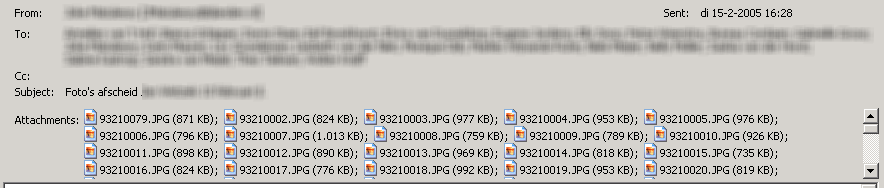
It was addresses to several internal recipients and as you know Exchange 2010 no longer supports Single Instance Storage.

[...] ec=1242)This error occurs because of a size constraint just like the one in the previous part.But the strange part is that it seems to be a PST file (type IPM.Document.PSTFile) located in the [...]