
 In a Comment on my Article "Installing Dell Wireless 5530 HSPA Mini PCI", Florian asked how to Install Dell's R298998 driver on non authorized system and card combinations.
I decided to have a look and downloaded this driver. The structure isn't much different from the R251153 driver I described in my earlier post.
When installing it on a non authorized card/laptop combination the error is similar:
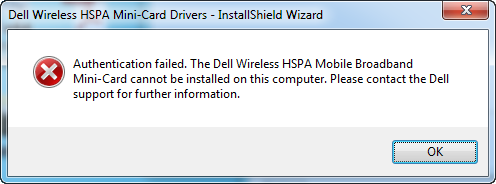
When the error message appeared I looked into the temp folder and I noticed that just like before 2 folders were created (with a GUID as name). One of these folders contained the file driver_auth.exe which, as I already knew, performs the actual validation.
I loaded driver_auth.exe in Ida and in the Strings windows I searched for "dell_wwan_sysID.dat". As I described earlier this is an encrypted file that contains the list of authorized combinations.
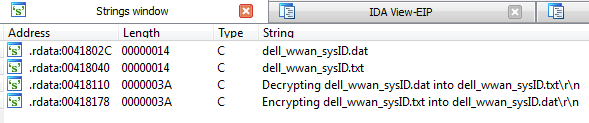
There were only 2 references (Ctrl-X) to this string:
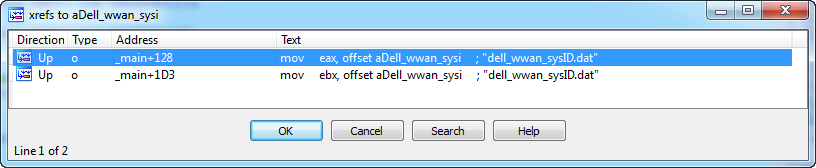
This reference (last line in the screenshot below) brings us to the right place because a little above it is a debug output line that says: "Decrypting dell_wwan_sysID.dat into dell_wwan_sysID.txt":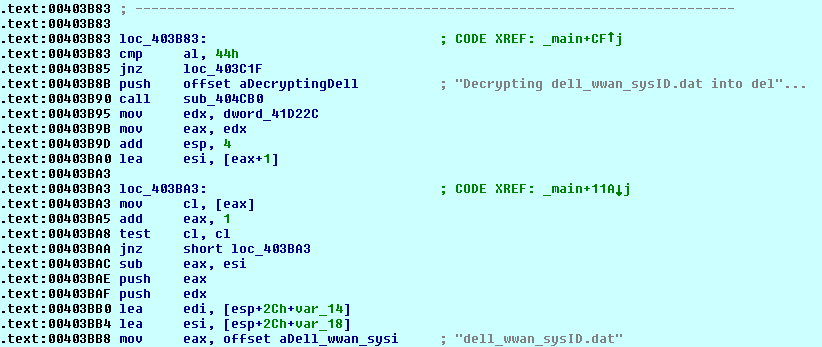
A little above in the code is a Switch statement that operations on the first commandline argument:
![jmp ds:off_403e44[ecx*4]](/blog/wp-content/uploads/2011/11/image6.webp "switch jump")
On case 68 or 76 a password check (password is expected as 2nd parameter) is done (notice that ASCII 68 = 'D' and 76 = 'L'):

We could of course patch jzn (Jump when Not Zero) to jz (Jump when Zero) to accept any password but I used Ida's integrated debugger to read the password.
Oh you want to know what the password is?
It's "HELMSLEY" (in capitals).
The following commandlines are possible:
Test authorized combination:
driver_auth.exe -U "dell_wwan_sysID.dat" D5530

Decrypt dell_wwan_sysID.dat to dell_wwan_sysID.txt:
driver_auth.exe -D HELMSLEY "dell_wwan_sysID.dat"

Encrypt dell_wwan_sysID.txt to dell_wwan_sysID.dat:
driver_auth.exe -L HELMSLEY dell_wwan_sysID.txt
So let's decrypt the file:
563,1, Dell Latitude E600 Notebook (Roush), D5530 | D5540
564,1, Dell Precision M2400 Notebook (Heelys), D5530
589,1, Dell Latitude E400 Notebook (Lola), D5530
591,1, Dell Latitude E800 Notebook (Maybach), D5530 | D5540
592,1, Dell Precision E4400 Notebook (Avia), D5530
593,1, Dell Precision M6400 Notebook (Nike), D5530
594,0, Dell Latitude XT2 Notebook (AMG), D5530
596,0, Dell Studio 1535 Notebook (Hepburn-Intel), D5530
597,0, Dell Studio 1536 Notebook (Hepburn-AMD), D5530
598,0, Dell Studio 1735 Notebook (Pacino-Intel), D5530
602,0, Dell Studio 1435 Notebook (Diaz-Intel), D5530
610,1, Dell Latitude E5400 Notebook (Foose 14I), D5530
625,1, Dell Inspiron XPS M1340 Notebook (Jolie), D5530 | D5540
626,1, Dell Inspiron XPS M1540 Notebook (Paltrow), D5530 | D5540
631,1, Dell Latitude E2205 (MiniCooper), D5530 | D5540
671,0, Dell Studio 1537 Notebook (Hepburn-Intel MV), D5530
672,0, Dell Studio 1737 Notebook (Pacino-Intel MV), D5530
688,0, Dell Inspiron 910 Netbook (QiaoHong), D5530
689,0, Dell Inspiron 1210 Netbook (YaoMing), D5530
697,1, Dell Consumer Notebook (Adamo13), D5530
698,1, Dell Studio Notebook (Braxton), D5530
700,1, Dell Vostro 1520 Notebook (HPB M), D5530
701,1, Dell Studio 1557 Notebook (Hanks MLK Clarksfield), D5540
702,1, Dell Studio 1555 Notebook (Hanks-Intel MV), D5530
710,1, Dell Notebook (Tiger), D5530
712,1, Dell Ultra Premium Notebook (Envy), D5530
708,1, Dell Adamo XPS nine (Halo), D5540
744,1, Dell Studio 14 Notebook (Phelps), D5530
746,1, Dell Studio 1745 Notebook (Poitier MV), D5530 | D5540
747,1, Dell Studio 1745 Notebook (Poitier CP), D5540
756,1, Dell Inspiron 1011 (Bear), D5530 | D5540
766,1, Dell Studio XPS 1645 Notbook (Paltrow MLK 2), D5540
1028,1, Dell Studio 1457 Notebook (Phelps MLK), D5530
1033,1, Dell Inspiron 111 (Argos), D5530 | D5540
1034,1, Dell Latitude Roush follow-on (Rothschild), D5540
1035,1, Dell Latitude Maybach follow-on (Margaux), D5540
1036,1, Dell Mobile Precision M4410 (Asics), D5530
1040,1, Dell Latitude E4310 (Lafite), D5540
1043,1, Dell Studio 1558 Notebook (Hanks Arrandale), D5540
1044,1, Dell Studio 1458 Notebook (Phelps Arrandale), D5540
1048,1, Dell Inspiron 1370 Notebook (Aniston), D5540
1049,1, Dell Studio XPS 164x Notebook (Paltrow Arrandale), D5540
1050,1, Dell Inspiron 1012 Netbook (Samos), D5540
1050,0, Dell Inspiron 1012 Netbook (Samos), D5541
1051,1, Dell Studio 1749 Notebook (Poitier Arrandale), D5540
1065,1, Dell Latitude 5410 (Fonseca 14), D5540
1067,1, Dell Vostro U300 (RYU), D5540
1074,0, Dell Latitude 13 (DOM), D5540
1078,1, Dell Inspiron 1016 Netbook (Crete), D5540
1079,1, Dell Adamo fourteen (Miso), D5540
1087,1, Vostro 2330 (Winery 13), D5540
1088,1, Vostro 2430 (Winery 14), D5540
1089,1, Vostro 2530 (Winery 15), D5540
1094,1, Dell Adamo fifteen (Panerai), D5540
1098,1, Dell Inspiron 13Z (CID Intel), D5540
1099,1, Dell Inspiron M301Z (CID AMD), D5540
1121,1, Dell Latitude 2110 (Motts), D5540
1127,1, Dell Studio XPS 14 (Nichols Intel (Pure UMA, Pure Discrete gfx)), D5540
1128,1, Dell Studio XPS 14 (Nichols Intel (switchable Gfx)), D5540
1129,1, Dell Studio 15 (Nimoy AMD (Pure UMA, Pure Discrete gfx)), D5540
1130,1, Dell Studio 15 (Nimoy AMD (switchable Gfx)), D5540
1131,1, Dell Studio 17 (Shatner Intel (Pure UMA, Pure Discrete gfx)), D5540
1132,1, Dell Studio 17 (Shatner Intel (switchable Gfx)), D5540
1133,1, Dell Studio XPS 15 (Nimoy Intel (Pure UMA, Pure Discrete gfx)), D5540
1134,1, Dell Studio XPS 15 (Nimoy Intel (switchable Gfx)), D5540
1136,1, Dell Inspiron 1120 Netbook (Andros), D5540
1137,1, Dell Inspiron 1121 Netbook (Andros+), D5540
1138,1, Dell Inspiron 1017 Netbook (Samos MLK), D5540
1148,1, Dell Latitude 5411 (Fonseca 14 Blue), D5540
1180,1, Dell Vostro (RYU2), D5540
1199,1, Dell Inspiron N3110 (Queens 13), D5540
1225,1, Dell Inspiron N3110 (Queens 13 - Switchable Graphic), D5540
1200,1, Dell Inspiron N5110 (Queens 15 - Intel), D5540
1201,1, Dell Inspiron M5110 (Queens 15 - AMD), D5540
1226,1, Dell Inspiron N5110 (Queens 15 - Switchable Graphic), D5540
1227,1, Dell Inspiron M5110 (Queens 15 AMD - Switchable Graphic), D5540
1217,1, Dell Inspiron 14 (Queens 14 - Intel), D5540
1218,1, Dell Inspiron 14 (Queens 14 - AMD), D5540
1219,1, Dell Inspiron 14 (Queens 14 - AMD Switchable Graphic), D5540
1239,1, Dell Inspiron 14 (Queens 14 - Intel Pure UMA), D5540
1220,1, Dell Inspiron 17 (Queens 17 - Intel Switchable), D5540
1240,1, Dell Inspiron 17 (Queens 17 - Intel Pure UMA), D5540
1202,1, Dell Vostro 13 (Nirvana 13), D5540 | D5550
1228,1, Dell Vostro 13 (Nirvana 13 - Switchable Graphic), D5540 | D5550
1203,1, Dell Vostro 15 (Nirvana 15), D5540 | D5550
1229,1, Dell Vostro 15 (Nirvana 15 - Switchable Graphic), D5540 | D5550
1221,1, Dell Vostro 14 (Nirvana 14 - Switchable Graphic), D5540 | D5550
1241,1, Dell Vostro 14 (Nirvana 14), D5540 | D5550
1222,1, Dell Vostro 17 (Nirvana 17 - Switchable Graphic), D5540 | D5550
1242,1, Dell Vostro 17 (Nirvana 17), D5540 | D5550
1299,1, Dell Vostro 3555 (Nirvana 15 AMD UMA), D5540 | D5550
1300,1, Dell Vostro 3555 (Nirvana 15 AMD PowerXpress4), D5540 | D5550
1301,1, Dell Vostro 14 (Nirvana 14 - AMD UMA), D5540 | D5550
1302,1, Dell Vostro 14 (Nirvana 14 - PowerXpress4), D5540 | D5550
1205,1, Dell XPS 15 (Nimoy MLK 15), D5540 | D5550
1206,1, Dell XPS 15 (Nimoy MLK 15 - Optimus), D5540 | D5550
1207,1, Dell XPS 17 (Shatner MLK 17), D5540 | D5550
1208,1, Dell XPS 17 (Shatner MLK 17 - Optimus), D5540 | D5550
1223,1, Dell XPS 14 (Nichols MLK 14), D5540
1170,1, Dell Latitude E6320 (Macallan 13), D5550
1171,1, Dell Latitude E6420 (Macallan 14), D5550
1172,1, Dell Latitude E6520 (Macallan 15), D5550
1178,1, Dell Latitude 15 Huron River (Krug 15), D5550
1179,1, Dell Latitude 14 Huron River (Krug 14), D5550
1187,1, Dell Precision M4600 (Brooks 15 Huron River), D5550
1188,1, Dell Precision M6600 (Brooks 17 Huron River), D5550
1189,1, Dell Latitude (Dole), D5540 | D5550
1193,1, Dell Latitude 12 Huron River (Vida), D5550
1204,1, Dell Latitude Tablet PC Huron River (Patron), D5550
1247,1, Dell Andros MLK, D5540 | D5550
1258,1, Dell Netbook (Zuma), D5550
1295,1, Dell Inspiron 13z (Nora), D5550
1296,1, Dell Vostro V131 (Jones), D5550
1252,1, Dell E6420 XFR (Macallan 14 XFR), D5550
1291,1, Dell Business Client Tablet (Peju), D5550
1311,1, Dell XPS 14z (Breitling UMA), D5550
1314,1, Dell XPS 14z (Breitling Optimus), D5550
This is the last line in the system ID file
So how do we know what line we need to modify?
Simple, use the -U switch, in my case I have a D5530 card so I use the following commandline:
driver_auth.exe -U "C:\_WWAN\dell_wwan_sysID.dat" D5530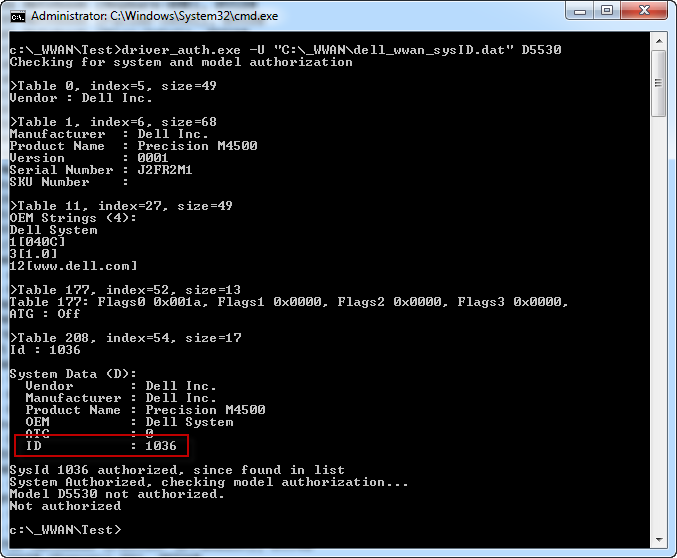
So my system has ID 1036, according to the list ONLY the combination of 1036 and Dell 5540 is authorized
1036,1, Dell Mobile Precision M4410 (Asics), D5540So we change it and add the D5530:
1036,1, Dell Mobile Precision M4410 (Asics), D5530 | D5540Save the file and encrypt it:
driver_auth.exe -L HELMSLEY dell_wwan_sysID.txtAnd let's check again:
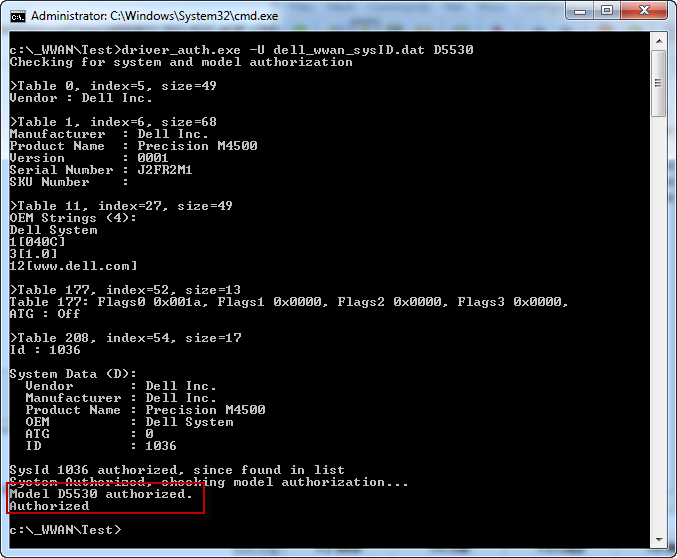
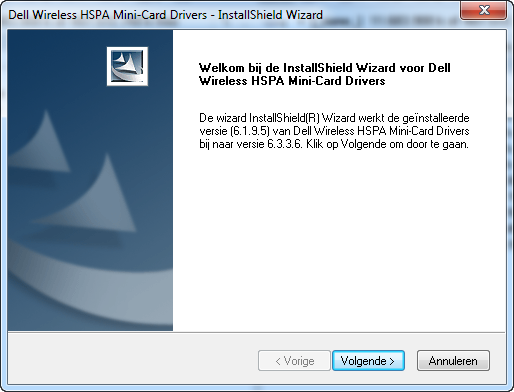
And no more Error:
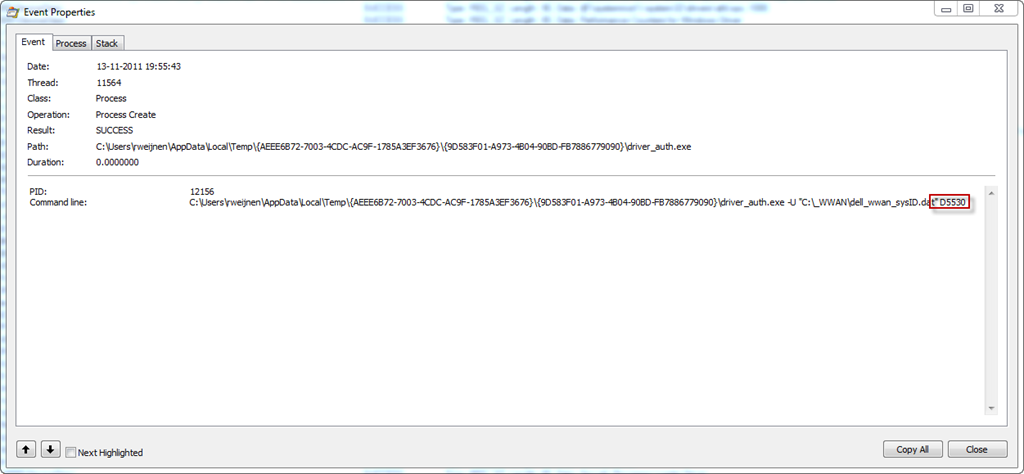
If you are not sure which card you have then use Process Monitor during the installation with the following Filter:
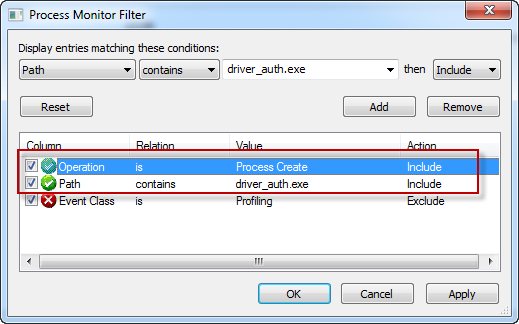
Use the last parameter in the Commandline:
If this article was helpful to you please leave a comment.

[...] If you have a Lenovo machine with a Bios WhiteList you may find a solution here EDIT 2: See my followup article to learn how to reverse driver_auth.exe, decrypt and encrypt dell_wwan_sysID.dat.share: Bookmark [...]
Great work, much appreciated and thanks for the insight in your work.
Very good job. Helped me a lot. Greetings from Germany.
[...] to modify dell_wwan_sysid file - Today, 11:45 PM Installing Dell Wireless 5530 HSPA Mini PC #2 Have fun. [...]
Great work, excelent guide. Do you think that same method apply for dell's multimode drivers?
From what i have seen now they have a new kind of protection a Models.zip that it's password protected and that has inside SystemID.txt . Do you think that you could find the password for those as well?
Here it's an example link.
http://downloads.dell.com/comm/DRVR_WIN_R275084.EXE
From what i have seen they use this method for all evdo and multimode cards DW5620;DW5630;DW5800
Just read your original article and used that to get installed. But this is great stuff too (thanks!) and will try this if/when I need to update drivers.
Very interesting article! Question, please: I have a Dell E6500 with built-in 5530 HSPA card - but it wouldn't work here in eastern canada... I gave up troubleshooting and called Dell support, who said it only works with an AT&T SIM card. AT&T isn't available here... When I plugged in the SIM I use (by a company called Telus) - the SIM gets recognized, it says it's connected - but no internet access... Soooo: do you think IDA can be used to find the code that only allows AT&T, and open it to another provider? THANKS!
@Mark: I've never seen SIM locks on the Dell cards so my guess is that your problem is the GSM frequency in which case you are out of luck :-(
"on non authorized system and card combinations." is not correct. driver_auth.exe -U always returns zero output on non-Dell systems, so you need at least a Dell notebook.
I have a 5620 that I am trying to install on a dell laptop. I followed your guide but the installer does not unpack to a temp folder, it unpacks to several .tmp files so I cannot access the driver_auth.exe. Thoughts?
To clarify my earlier post: The password provided does not work, apparently they changed it for this model. Also, I made a mistake, it did not unpack to .tmp files, I just assumed it did based on timestamp but after clearing out the folder and trying it again I now realize that it does not create anything at all in the temp folder, not even in windows\temp. Looks like I might just have to buy a compatible card.
Just used these instructions to install the WWAN card from my Latitude ST (WinXP) in my 6430u (Win 8). Worked like a charm and I'm submitting this comment via AT&T. Thank you very much Remko!!!
I tried this method with the new DW5550(f5521gw) drivers that Dell has, but it keeps giving me the 5530 drivers instead. Any suggestions?
fantastic work. thx. after all did you put the gps to work too?
Thanks for sharing this tutorial. now I can use DW5550 with my inspiron 1420.
Great Job !!!! But the link R298998 : http://support.dell.com/support/downloads/download.aspx?c=us&cs=19&l=en&s=dhs&releaseid=R298998&SystemID=VOS_N_3450&servicetag=&os=W764%20&osl=en&deviceid=25633&devlib=0&typecnt=0&vercnt=1&catid=-1&impid=-1&formatcnt=0&libid=20&typeid=-1&dateid=-1&formatid=-1&source=-1&fileid=448952 doesn't work...
I've follow the other tutorial on the link /2011/05/27/installing-dell-wireless-5530-hspa-mini-pci/ and it's perfect...
Thanks a lot! I managed to install my D5540 card (harvested from a Latitude I had before) into my Precision M4800 (ID:1484) with these instructions.
Thank you.
I had an old D5530 from one of my old E4300 and I got it installed on my E6510 with your instructions.
Though at first I had trouble with the -U switch on the driver_auth.exe.
Turns out not all of the versions support it and just give nothing as response. Luckily the later version I downloaded worked fine (first one was meant for E6500, I think).
The Latitude E6510 is called:
"1035,1, Dell Latitude Maybach follow-on (Margaux)"
... whichs explains why I had such trouble finding the ID from the text file... ;)