
 Yesterday I showed a video demonstrating it's possible to run multiple instances of the Microsoft Lync 2010 client simultaneously.
A little warning before we go on: the Lync Client was not designed to run with multiple instances. Or better said: it was designed specifically to prevent this, let's see how it does this:
On startup Lync calls an internal function called COcAppNoUI::InitializeMainInstance. In this function it creates a Mutex named "Office Communicator_" in the Global namespace. It also creates an Event in the Global namespace called "COMMUNICATOR-".
When a second instance of Lync is launched it checks if the Global Mutex exists and if it does it fires the Global Event. The Main instance has a thread that waits for this event using the WaitForMultipleObjects API.
Let's check this using Process Explorer, select the Lync process (communicator.exe) and display the process handles in the lower pane view:
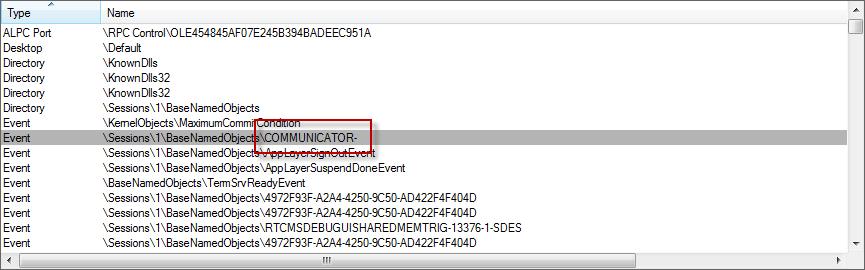
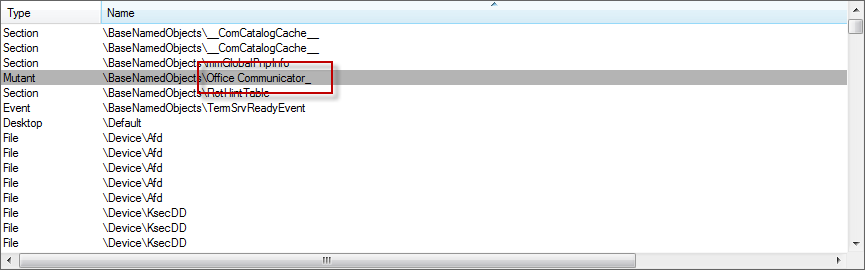
If we close the handles to the Mutex and the Event (which is NOT recommended) we are able to launch a second instance of Lync.
But to get a fully working Lync Client we there a few more things we need to take care of:
Shared Memory Section
Lync creates a shared memory section named "MicrosoftOfficeCommunicatorSharedMemoryAccess". Since we do not know what kind of data is exchanged in this shared section we must ensure that each instance has it's own sections.
Additional Mutexes
Lync creates several additional Mutexes that need to be unique as well. Unfortunately the Mutex names are composed in a special way;
The first Mutex is named "<guid> - SID" eg: "eed3bd3a-a1ad-4e99-987b-d7cb3fcfa7f0 - S-1-5-21-1792247254-158287795-3068212004-1000". The guid is obtained by calling the GetUserNameEx API with the NameUniqueId parameter. The SID is of course the SID of the logged-on user.
The second Mutex is named "Communicator.<#>_<SID>" eg: "Communicator.0_S-1-5-21-1792247254-158287795-3068212004-1000"
Registry
Lync stores it's user settings in HKCU\Software\Microsoft\Communicator. Every instance will need it's own settings or it will user (and overwrite) the settings of other users. This includes the sign-in address and the (encrypted) password.
Although I was able to run two instances of the Lync Client locally by closing the handles I decided the easiest solution was to use Application Virtualization. In this how-to I will use ThinApp.
ThinApp
To get the Lync Client to work with ThinApp we need to enable external out-of-process COM objects to run by adding the following line to the package.ini:
[BuildOptions]
VirtualizeExternalOutOfProcessCOM=0
Next we need to make sure that we isolate the Mutexes and Events by adding the following line to the package.ini:
[BuildOptions]
IsolatedSynchronizationObjects=*MicrosoftOfficeCommunicatorSharedMemoryAccess*;*COMMUNICATOR-*;*Office Communicator_*;*Communicator.*;* - S-1-5-21-*
As you can see I used wildcards to match both Local and Global objects and to match the Guid and Sid.
ThinApp failThinApp will now add the Sandbox Path to the object name, however for some reason it fails to do this for the "COMMUNICATOR-" event:
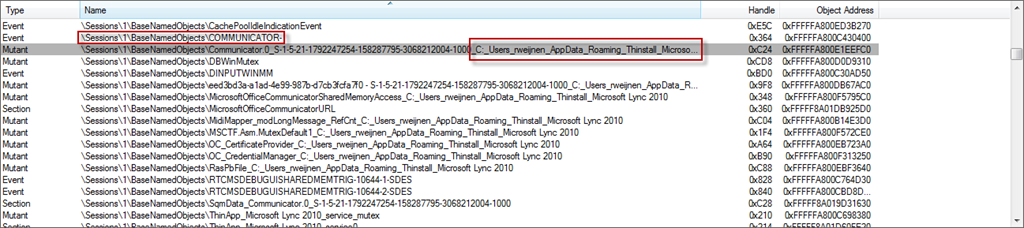
I tried several variation with wildcard but I didn't get this thing to work. I presume this happens because the event name is not hardcoded but assembled from a dynamic string.
Delphi to the rescue
To solve this final step I wrote a small commandline tool in Delphi that searches for the Communicator.exe process and closes the handles to the “COMMUNICATOR-” event. I will go into details about the Delphi code below as it’s out of scope for this blog. If you have questions about the code please let me know.
program CloseEvent;

{$APPTYPE CONSOLE}

uses
  JwaWinBase,
  JwaWinNT,
  JwaWinType,
  JwaNtStatus,
  JwaNative,
  JwaWinsta,
  SysUtils, StrUtils;

{$IFDEF RELEASE}
  // Leave out Relocation Table in Release version
  {$SetPEFlags IMAGE_FILE_RELOCS_STRIPPED}
{$ENDIF RELEASE}
{$SetPEOptFlags IMAGE_DLLCHARACTERISTICS_TERMINAL_SERVER_AWARE}

// No need for RTTI
{$WEAKLINKRTTI ON}
 {$RTTI EXPLICIT METHODS([]) PROPERTIES([]) FIELDS([])}

const
  EventName = 'COMMUNICATOR-';

var
  dwPid: DWORD;
  hProcess: THandle;

{$ALIGN 8}
{$MINENUMSIZE 4}
type
  _SYSTEM_HANDLE = record
    ProcessId: ULONG;
    ObjectTypeNumber: Byte;
    Flags: Byte;
    Handle: USHORT;
    _Object: PVOID;
    GrantedAccess: ACCESS_MASK;
  end;
  SYSTEM_HANDLE = _SYSTEM_HANDLE;
  PSYSTEM_HANDLE = ^SYSTEM_HANDLE;

  _SYSTEM_HANDLE_INFORMATION = record
    HandleCount: ULONG;
    Handles: array[0..0] of SYSTEM_HANDLE;
  end;
  SYSTEM_HANDLE_INFORMATION = _SYSTEM_HANDLE_INFORMATION;
  PSYSTEM_HANDLE_INFORMATION = ^SYSTEM_HANDLE_INFORMATION;

  _OBJECT_NAME_INFORMATION = record
    Length: USHORT;
    MaximumLength: USHORT;
    Pad: DWORD;
    Name: array[0..MAX_PATH-1] of Char;
  end;
  OBJECT_NAME_INFORMATION = _OBJECT_NAME_INFORMATION;
  POBJECT_NAME_INFORMATION = ^OBJECT_NAME_INFORMATION;

function GetObjectName(const hObject: THandle): String;
var
  oni: OBJECT_NAME_INFORMATION;
  cbSize: DWORD;
  nts: NTSTATUS;
begin
  Result := '';

  cbSize := SizeOf(oni) - (2 * SizeOf(USHORT));
  oni.Length := 0;
  oni.MaximumLength := cbSize;
  nts := NtQueryObject(hObject, ObjectNameInformation, @oni, cbSize, @cbSize);
  if nts = STATUS_SUCCESS then
  begin
    Result := oni.Name;
  end;
end;

function GetCurrentSessionId: DWORD;
 asm
   mov     eax,fs:[$00000018];   // Get TEB
   mov     eax,[eax+$30];        // PPEB
   mov     eax,[eax+$1d4];       // PEB.SessionId
 end;

function GetProcessByName(const ProcessName: string): DWORD;
var
  ProcName: PChar;
  Count: Integer;
  tsapi: PTS_ALL_PROCESSES_INFO_ARRAY;
  i: Integer;
  dwSessionId: DWORD;
begin
  Result := 0;
  tsapi := nil;

  if not WinStationGetAllProcesses(SERVERNAME_CURRENT, 0, Count, tsapi) then
    Exit;

  ProcName := PChar(ProcessName);
  dwSessionId := GetCurrentSessionId;

  WriteLn(Format('Looking for Process %s in Session %d',
    [ProcessName, dwSessionId]));

  for i := 0 to Count - 1 do
  begin
    with tsapi^[i], tsapi^[i].pTsProcessInfo^ do
    begin
      if (dwSessionId = SessionId) and (ImageName.Buffer <> nil) and
        (StrIComp(ProcName, ImageName.Buffer) = 0) then
      begin
        Result := UniqueProcessId;
        WriteLn(Format('%s has Pid %d', [ProcessName, Result]));
        Break
      end;
    end;
  end;

  if tsapi <> nil then
    WinStationFreeGAPMemory(0, tsapi, Count);
end;

procedure EnumHandles;
var
  shi: PSYSTEM_HANDLE_INFORMATION;
  cbSize: DWORD;
  cbRet: DWORD;
  nts: NTSTATUS;
  i: Integer;
  hDupHandle: THandle;
  dwErr: DWORD;
  ObjectName: string;
begin
  WriteLn('Enumerating Handles');
  cbSize := $5000;
  GetMem(shi, cbSize);
  repeat
    cbSize := cbSize * 2;
    ReallocMem(shi, cbSize);
    nts := NtQuerySystemInformation(SystemHandleInformation, shi, cbSize, @cbRet);
  until nts <> STATUS_INFO_LENGTH_MISMATCH;

  if nts = STATUS_SUCCESS then
  begin
    for i := 0 to shi^.HandleCount - 1 do
    begin
      if shi^.Handles[i].GrantedAccess <> $0012019f then
      begin
        if shi^.Handles[i].ProcessId = dwPid then
        begin
          nts := NtDuplicateObject(hProcess, shi^.Handles[i].Handle,
            GetCurrentProcess, @hDupHandle, 0, 0, 0);

          if nts = STATUS_SUCCESS then
          begin
            ObjectName := GetObjectName(hDupHandle);
            if (ObjectName <> '') and SameText(RightStr(ObjectName, Length(EventName)), EventName) then
            begin
              WriteLn(Format('Handle=%d Name=%s', [shi^.Handles[i].Handle, ObjectName]));
              CloseHandle(hDupHandle);

              nts := NtDuplicateObject(hProcess, shi^.Handles[i].Handle,
                GetCurrentProcess, @hDupHandle, 0, 0, DUPLICATE_CLOSE_SOURCE);

              if nts = STATUS_SUCCESS then
              begin
                WriteLn(Format('Duplicated Handle with DUPLICATE_CLOSE_SOURCE, new Handle=%d', [hDupHandle]));
              end;
            end;

            if hDupHandle > 0 then
              CloseHandle(hDupHandle);
          end;
        end;
      end;
    end;
  end
  else begin
    dwErr := RtlNtStatusToDosError(nts);
    WriteLn(Format('Failed to read handles, NtQuerySystemInformation failed with %.8x => %d (%s)', [nts, SysErrorMessage(dwErr)]));
  end;

  FreeMem(shi);
end;


procedure AnyKey(const bExit: Boolean = False);
begin
    WriteLn('Finished');
    WriteLn('Press any key to continue');
    ReadLn;
    if bExit then
      Exit;
end;

begin
  try
    WriteLn('CloseEvent 1.0 (c) Remko Weijnen 2012');
    WriteLn('(closes "COMMUNICATOR-" event handle)');
    WriteLn('');

    dwPid := GetProcessByName('Communicator.exe');
    if dwPid = 0 then
    begin
      WriteLn('Process was not found, exiting.');
      AnyKey(True);
      Exit;
    end;

    WriteLn(Format('Opening Process %d with PROCESS_DUP_HANDLE', [dwPid]));
    hProcess := OpenProcess(PROCESS_DUP_HANDLE, False, dwPid);

    if hProcess = 0 then
    begin
      WriteLn(Format('OpenProcess failed with %s', [SysErrorMessage(GetLastError)]));
      AnyKey(True);
    end
    else begin
      WriteLn(Format('Process Handle is %d', [hProcess]));
    end;

    EnumHandles;

  except
    on E: Exception do
      Writeln(E.ClassName, ': ', E.Message);
  end;
end.
I then added a vb script to the ThinApp that calls the commandline tool:
Function OnFirstParentStart
	Set WshShell = CreateObject("Wscript.Shell")
	strCmdLine = Chr(34) & ExpandPath("%ProgramFilesDir%\Microsoft Lync\CloseEvent.exe") & Chr(34)
        iPid = ExecuteVirtualProcess(strCmdLine)

	If iPid > 0 Then
		WaitForProcess iPid, 0
	End If
End Function
It's not ideal but it works
Registry
ThinApp will virtualize the Registry in the Sandbox by default so we don't need to do anything there.
We can now run one instance of Lync natively and another instance ThinApped.
From my (limited) testing all functionalities seem to work including Instant Messaging and Lync Call but please do keep in mind that this method IS NOT SUPPORTED IN ANY WAY!
Download
I have added a download below for the package.ini I used, the KillMutex.vbs script and the CloseMutex commandline tool (including source).

Hi Remko,
Does this method work with Office 2007 too? or can it be tweaked to make it work with office2007 somehow?
Dear Remko
So how do you execute the components in DualLync?
CloseEvent
KillMutex
Package
Regards
Dinos
Hi, have someone test it with Lync 2013?
Is this workaround still needed?
Best regards
Ralf
That is one fantastic solution!
Unfortunately our company migrated to Skype for Business 2016. From what I see only lync.exe process is running, no communicator.exe. I guess it's too much work to patch the code to support newer clients?
I am planning to have a look when I find some time...