
If you want to Create an Active Directory group with PowerShell there are a few things you need to be aware of:
First of all there is no direct way to create new objects in Active Directory. You always need to bind to the Domain or an Organizational Unit and call the Create method.
Example:
powershell
Download
# Bind to OU
$ou = [ADSI]"LDAP://OU=OU=Groups,DC=Contoso,DC=COM"

# Create the Group
$group = $ou.Children.Add("CN=TestGroup", "Group")
$group.CommitChanges()
However the group is not yet complete:
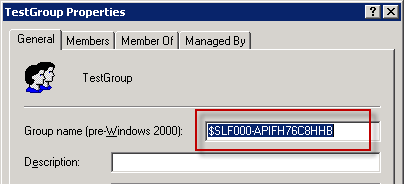
So we need to set the sAMAccountName property:
powershell
Download
# Create the Group
# Bind to OU
$ou = [ADSI]"LDAP://OU=OU=Groups,DC=Contoso,DC=COM"

$group = $ou.Children.Add("CN=TestGroup", "Group")

# Set Account Name
$group.sAMAccountName = "TestGroup"

# Commit Changes
$group.CommitChanges()
however this will fail with the error message:
powershell
Download
Exception calling "CommitChanges" with "0" argument(s): "A constraint violation occurred. (Exception from HRESULT: 0x8007202F)"This happens because we first need to call CommitChanges() before setting additional properties:
powershell
Download
# Bind to OU
$ou = [ADSI]"LDAP://OU=OU=Groups,DC=Contoso,DC=COM"

# Create the Group
$group = $ou.Children.Add("CN=TestGroup", "Group")

# Commit Changes
$group.CommitChanges()

# Set Account Name
$group.sAMAccountName = "TestGroup"

# Commit Changes
$group.CommitChanges()
Last step is to change the group type, which can be done using the groupType property:
powershell
Download
# These constants come from Iads.h
$ADS_GROUP_TYPE_GLOBAL_GROUP       = 0x2
$ADS_GROUP_TYPE_DOMAIN_LOCAL_GROUP = 0x4
$ADS_GROUP_TYPE_LOCAL_GROUP        = 0x4
$ADS_GROUP_TYPE_UNIVERSAL_GROUP    = 0x8
$ADS_GROUP_TYPE_SECURITY_ENABLED   = 0x80000000

# Set GroupType
$group.groupType = $ADS_GROUP_TYPE_GLOBAL_GROUP -bor $ADS_GROUP_TYPE_SECURITY_ENABLED
And all the pieces together:
powershell
Download
# These constants come from Iads.h
$ADS_GROUP_TYPE_GLOBAL_GROUP       = 0x2
$ADS_GROUP_TYPE_DOMAIN_LOCAL_GROUP = 0x4
$ADS_GROUP_TYPE_LOCAL_GROUP        = 0x4
$ADS_GROUP_TYPE_UNIVERSAL_GROUP    = 0x8
$ADS_GROUP_TYPE_SECURITY_ENABLED   = 0x80000000

# Bind to OU
$ou = [ADSI]"LDAP://OU=Applications,OU=Groups,OU=GHZ,DC=ZORGMH,DC=LOCAL"

# Create the Group
$group = $ou.Children.Add("CN=TestGroup", "Group")

# Commit Changes
$group.CommitChanges()

# Important: first call CommitChanges() before setting other properties!
# Else you will get ERROR_DS_CONSTRAINT_VIOLATION (0x8007202F)

# Set Account Name
$group.sAMAccountName = "TestGroup"

# Set GroupType
$group.groupType = $ADS_GROUP_TYPE_GLOBAL_GROUP -bor $ADS_GROUP_TYPE_SECURITY_ENABLED

# Commit Changes
$group.CommitChanges()
Quest and Microsoft have snapins for active directory, but this is really useful where neither can be used!
thanks for sharing.