
I am working on a launcher tool for Citrix XenApp that can not only connect to a published application or published desktop but can also leverage Citrix Workspace Control to reconnect to disconnected and/or active sessions.
There doesn't seem to be any sdk that exposed the data we need so I am trying to reproduce what the Citrix online plugi-in does.
I used a HTTP monitoring tool to capture the traffic between the Online plug-in and the Web Interface. First the online plug-in will retrieve the config.xml from the server specified via the Change Server option:
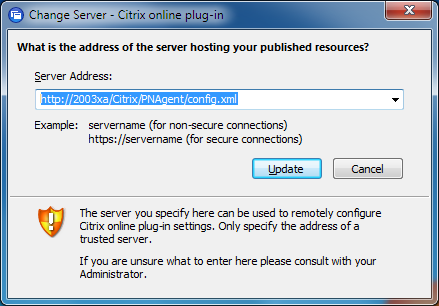
The config.xml is a rather large xml file, the interesting part is the Request.Enumeration (I left out the other data):
<?xml version="1.0" encoding="UTF-8"?>
<!DOCTYPE PNAgent_Configuration SYSTEM "PNAgent.dtd"[]>
<PNAgent_Configuration xmlns:xsi="http://www.w3.org/2000/10/XMLSchema-instance">
    <Request>
        <Enumeration>
            <Location replaceServerLocation="true" modifiable="true" forcedefault="false" RedirectNow="false">http://2003xa/Citrix/PNAgent/enum.aspx</Location>
            <Smartcard_Location replaceServerLocation="true">https://2003xa/Citrix/PNAgent/smartcard_enum.aspx</Smartcard_Location>
            <Integrated_Location replaceServerLocation="true">http://2003xa/Citrix/PNAgent/integrated_enum.aspx</Integrated_Location>
            <Refresh>
                <OnApplicationStart modifiable="false" forcedefault="true">true</OnApplicationStart>
                <OnResourceRequest modifiable="false" forcedefault="true">false</OnResourceRequest>
                <Poll modifiable="false" forcedefault="true">
                    <Enabled>true</Enabled>
                    <Period>6</Period>
                </Poll>
            </Refresh>
        </Enumeration>
        <Resource>
            <Location replaceServerLocation="true" modifiable="true" forcedefault="false" RedirectNow="false">http://2003xa/Citrix/PNAgent/launch.aspx</Location>
            <Smartcard_Location replaceServerLocation="true">https://2003xa/Citrix/PNAgent/smartcard_launch.aspx</Smartcard_Location>
            <Integrated_Location replaceServerLocation="true">http://2003xa/Citrix/PNAgent/integrated_launch.aspx</Integrated_Location>
        </Resource>
        <Reconnect>
            <Location replaceServerLocation="true" modifiable="true" forcedefault="false" RedirectNow="false">http://2003xa/Citrix/PNAgent/reconnect.aspx</Location>
            <Smartcard_Location replaceServerLocation="true">https://2003xa/Citrix/PNAgent/smartcard_reconnect.aspx</Smartcard_Location>
            <Integrated_Location replaceServerLocation="true">http://2003xa/Citrix/PNAgent/integrated_reconnect.aspx</Integrated_Location>
        </Reconnect>
        <Change_Password>
            <Location replaceServerLocation="true" modifiable="true" forcedefault="false" RedirectNow="false">http://2003xa/Citrix/PNAgent/change_password.aspx</Location>
        </Change_Password>
        <MachineControl>
            <Location replaceServerLocation="true">http://2003xa/Citrix/PNAgent/desktopControl.aspx</Location>
            <Smartcard_Location replaceServerLocation="true">https://2003xa/Citrix/PNAgent/smartcard_desktopControl.aspx</Smartcard_Location>
            <Integrated_Location replaceServerLocation="true">http://2003xa/Citrix/PNAgent/integrated_desktopControl.aspx</Integrated_Location>
        </MachineControl>
    </Request>
</PNAgent_Configuration>
From this xml data, the enum.aspx url is taken and another HTTP post is sent to that url which contains the following xml in my case:
<?xml version="1.0" encoding="UTF-8"?>
<!DOCTYPE NFuseProtocol SYSTEM "NFuse.dtd"><NFuseProtocol version="4.6">
	<RequestReconnectSessionData>
		<Credentials>
			<UserName>administrator</UserName>
			<Password encoding="ctx1">NFHALEBBMHGCLEBBMDGGKMAJNOHLLKBP</Password>
			<Domain type="NT">CONTOSO</Domain>
		</Credentials>
		<ClientName>REMLAPTOP</ClientName>
		<ClientName>REMLAPTOP</ClientName>
		<ServerType>win32</ServerType>
		<ClientType>ica30</ClientType>
		<SessionType>disconnected</SessionType>
		<SessionType>active</SessionType>
	</RequestReconnectSessionData>
</NFuseProtocol>
Notice that the password is encoded so if we want to replicate the HTTP post data we need to be able to encode (and perhaps decode) the password.
The decoding seems to be named Ctx1 but I couldn't find any information on how it should be encoded so I had to find it out myself.
I wrote a tool that that can encode and decode the passwords and I suspect the password decoding is the same as used for storing passwords in ica files (I haven't checked that yet...):
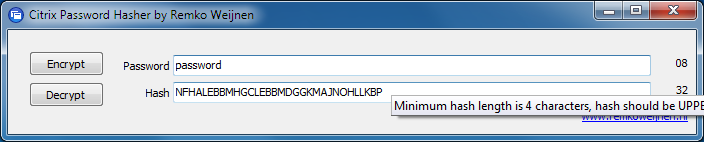
The tool can be downloaded below.

Hi Remko,
I am recently looking for ways how to encrypt citrix password, and found your program can work well for me.
Could you teach me what's the algorithm you used in this program?
[...] May After figuring out how to encode and decode the Citrix passwords my next step for the upcoming Citrix Launcher is experiment with config.xml and authenticating to [...]
[...] Possible values: An encrypted password. Remko Weijnen has written a tool to Encode (and decode) Citrix Passwords, you can find the tool here. [...]
[...] stored in RAM and regularly submits it off to the receiver (via an ica file connection). Remko has demonstrated before how to unhash this password, but nobody has yet discovered how to pull this information live [...]
[...] while ago I published a tool to Encode and Decode Citrix passwords. Today I am publishing a small update to this tool [...]
We are dealing with Citrix removed support for WISP, their component for interfacing with SharePoint.
We're looking at implementing our own web part. As part of that effort I'm communicating NFuse protocol with the Citrix XML Service. However, I ran into a problem retrieving Tickets, where I seem to need a "ctx1" encoded password.
I've been searching for the algorithm for this encode/decode with no luck. Can you share or point us to where we can find further information on this algorithm?
Thanks in advance for any assistance you provide to our non-profit organization.
Peter