
 I am using a PowerShell script to copy some elements of from the users old profile location to a new location. This includes the Nethood ("My Network Places") folder which contains the Network Places shortcuts.
A user reported that she could not save documents to Network Places anymore and after inspection the Network Places shortcuts were broken.
I started comparing the old Nethood folder to the new and observed the following difference in Explorer:

When copying entries from the Nethood folder with Explorer manually they worked fine, so somehow Explorer gives the Nethood folder special treatment.
When you browse the Nethood folder from a command prompt or a tool like Total Commander you can see that an entry in Nethood is really a folder containing 2 files:
- desktop.ini
- target.lnk
[.ShellClassInfo]
CLSID2={0AFACED1-E828-11D1-9187-B532F1E9575D}
Flags=2
The Guid {0AFACED1-E828-11D1-9187-B532F1E9575D} belongs to "Folder Shortcut" and indeed the shortcut in target.lnk is a shortcut to a folder.
If we inspect target.lnk we can see that's in indeed a shortcut to a (shared) folder:
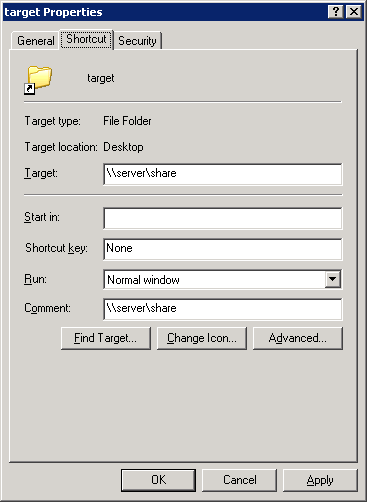
But there is two more ingredients missing for Explorer to show the folder as a Nethood entry:
- The folder needs to have the Read-only Attribute.
- The file desktop.ini needs to have the Hidden Attribute.
And this is exactly what went wrong in the PowerShell filecopy: the Read-only attribute wasn't copied along!
I wrote a Fixup function in PowerShell:
function FixUpNethood([string]$path)
{
	try
	{
		foreach ($item in (gci $path -ErrorAction:Stop))
		{
			$item.Attributes = [System.IO.FileAttributes]::ReadOnly
			$ini = gci (Join-path -Path $item.FullName -ChildPath 'desktop.ini') -Force
			$ini.attributes = [System.IO.FileAttributes]::System -bor [System.IO.FileAttributes]::Hidden
		}
	}
	catch {
		# ignore errors
	}

}
[...] PS: desktop.ini is a versatile file that’s used for many different purposes, for instance the Nethood or My Network Places as described by Remko Weijnen. [...]
Rather than ignoring the errors, it's quite easy to write to the Windows event log with "write-eventlog". You never know who might end up supporting the environment that you build.