
For an upcoming blog post I needed to decrypt some data using the rc4 algorithm. I wanted to do this with PowerShell but sadly PowerShell and the .NET framework have no functions for it.
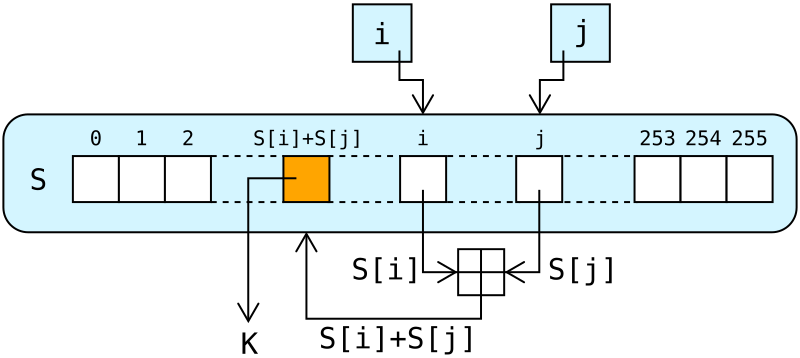
So I needed to implement it (download at the bottom of the post):
rc4 function · powershell
Download
function rc4 {
	param(
    	[Byte[]]$data,
    	[Byte[]]$key
  	)

	# Make a copy of the input data
	[Byte[]]$buffer = New-Object Byte[] $data.Length
	$data.CopyTo($buffer, 0)

	[Byte[]]$s = New-Object Byte[] 256;
    [Byte[]]$k = New-Object Byte[] 256;

    for ($i = 0; $i -lt 256; $i++)
    {
        $s[$i] = [Byte]$i;
        $k[$i] = $key[$i % $key.Length];
    }

    $j = 0;
    for ($i = 0; $i -lt 256; $i++)
    {
        $j = ($j + $s[$i] + $k[$i]) % 256;
        $temp = $s[$i];
        $s[$i] = $s[$j];
        $s[$j] = $temp;
    }

    $i = $j = 0;
    for ($x = 0; $x -lt $buffer.Length; $x++)
    {
        $i = ($i + 1) % 256;
        $j = ($j + $s[$i]) % 256;
        $temp = $s[$i];
        $s[$i] = $s[$j];
        $s[$j] = $temp;
        [int]$t = ($s[$i] + $s[$j]) % 256;
        $buffer[$x] = $buffer[$x] -bxor $s[$t];
    }

	return $buffer
}
And here is a usage example (the BinToHex and HexToBin functions are from my previous blog).
rc4 usage example · powershell
Download
$enc = [System.Text.Encoding]::ASCII
# The data we're going to encrypt
[Byte[]]$data = $enc.GetBytes("Hello World!")
# The key we're going to use
[Byte[]]$key = $enc.GetBytes("SECRET")

# Encryp the data, a byte array is returned
$EncryptedBytes = rc4 $data $key

# Convert the byte array into a hex string so we eg save it to disk
$EncryptedString = BinToHex $EncryptedBytes

# Now decrypt the data
[Byte[]]$data = HexToBin $EncryptedString
$DecryptedBytes = rc4 $data $key
$DecryptedString = $enc.GetString($DecryptedBytes)
[...] I decided to do this in PowerShell because it would be a nice exercise (in fact, that’s why I wrote the rc4 function I published earlier). [...]