
Some time ago I wrote about the PNAgent data that is stored in the registry in XML format.
After that post Andrew Morgan asked me if I could extract the PNAgent icons from the XML data.
That got me interested so let’s look at this data!
If you look at XML from PNAgent the icondata as in the AppData.Details.Icon node you’ll see something like this:
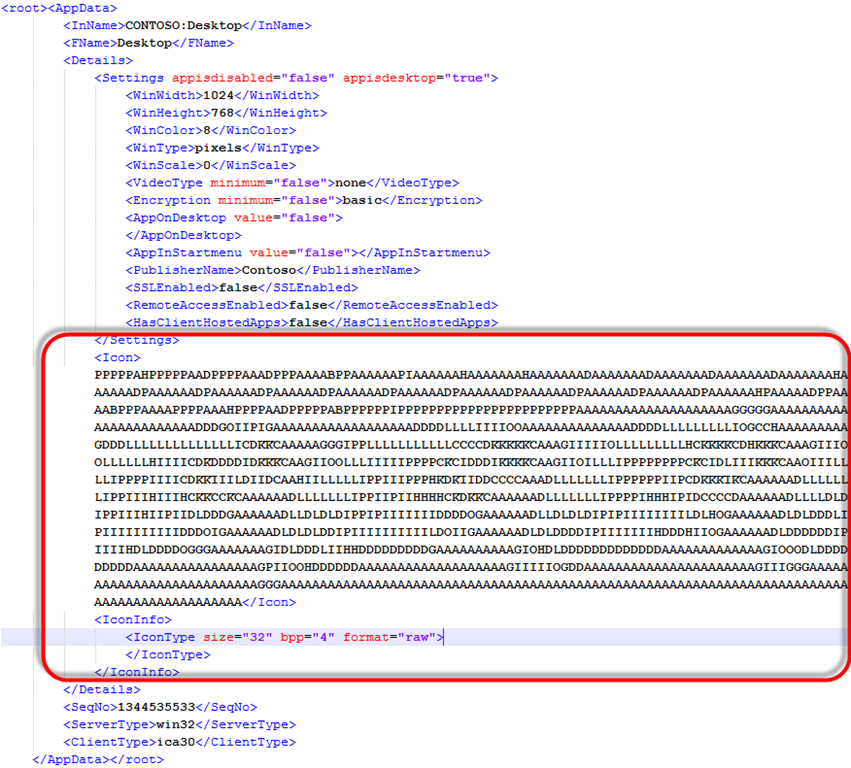
Seems like the icon data is stored/encrypted in a proprietary format.
Histogram
When reversing binary data, a histogram is often a very good method to visualize the data and draw some first conclusions. This is the Histogram of my Icon data:
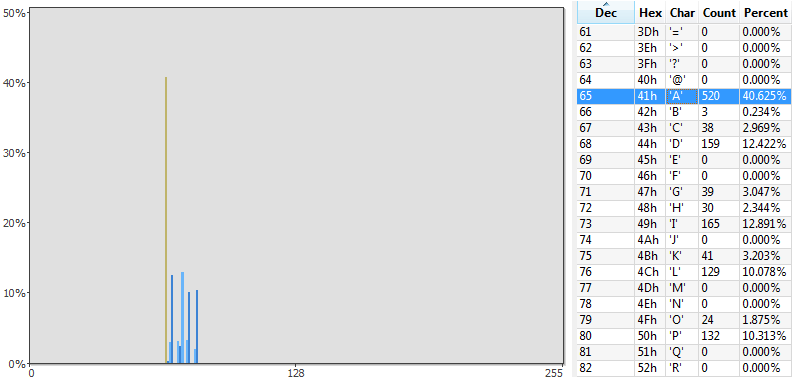
We can see that only the characters A..P occur and that A has by far the highest occurrence (40%).
- The data consists of 1280 bytes which gives us room for a 32*32 (1024 bytes) and a 16*16 icon (256 bytes)
- It's likely that the data is encoded in printable ASCII characters ('A'..'P') where 'A' means colour 0, 'B' colour 1 and so on.
- The range A..P gives room for 16 colours
- 'A' might be the background colour or white because it occurs the most.
So I wrote some testcode to draw a 32x32 icon from the data starting at offset one and at offset 256. Offset 0 clearly produced an incorrect image:

So the 16*16 icon comes first and the 32x32 icon second. But I didn’t yet know the correct colours.
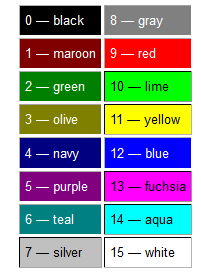
I did some experiments by presenting a full black icon, a full white icon and a checkerboard icon. After some experimenting I found out that PNAgent uses the Windows default 16-colour palette:
That look’s better:

I implemented drawing the icon by declaring the palette in an array indexed by the ASCII character:
const
  CtxPalette: array[65..80] of TColor = (clBlack, clMaroon, clGreen, clOlive,
    clNavy, clPurple, clTeal, clSilver, clGray, clRed, clLime, clYellow,
    clBlue, clFuchsia, clAqua, clWhite);
This makes drawing the icon very easy and fast:
procedure DrawIcon32(const IconData: String);
var
  Bitmap: TBitmap;
  x, y: Integer;
  Idx: Integer;
begin
  // Image dimensions are fixed to 32x32
  Image1.Width := 32;
  Image1.Height := 32;

  // Create a bitmap
  Bitmap := TBitmap.Create;
  try
    // Set bitmap dimensions
    Bitmap.Width := 32;
    Bitmap.Height := 32;

    // Fill the bitmap pixel by pixel, using scanline is a lot faster but this
    // is just for POC
    Idx := Length(IconData) - 1024;
    Assert(Idx > 0);
    for y := 0 to Bitmap.Height-1 do
    begin
      for x := 0 to Bitmap.Width-1 do
      begin
        // Get Color name from the Palette array
        Bitmap.Canvas.Pixels[x, y] := CtxPalette[Byte(IconData[Idx])];
        Inc(Idx);
      end;
    end;

    // Assign the bitmap to the Image (box) on the form
    Image1.Picture.Graphic := Bitmap;
  finally
    // Free the bitmap
    Bitmap.Free;
  end;
end;
To my disappointment the high resolution png icons are not in the xml data but can be requested from PNAgent by XML.
See Nicholas Dille’s post on the XMLServiceExplorer for more info.
