
 In a SCOM Management Pack Custom Properties can be used for Alert Description and Notification as described in this blog by Kevin Holman.
In my case I wanted to add the Display Name and the Performance Counter Value in a Performance Threshold Monitor. In XML it would look this this:
xml
Download
        <alertsettings alertmessage="Memory.Usage.AlertMessage">
          <alertonstate>Error</alertonstate>
          <autoresolve>true</autoresolve>
          <alertpriority>Normal</alertpriority>
          <alertseverity>MatchMonitorHealth</alertseverity>
          <alertparameters>
            <alertparameter1>$Target/Host/Property[Type="System!System.Entity"]/DisplayName$</alertparameter1>
            <alertparameter2>$Data/Context/Value$</alertparameter2>
          </alertparameters>
        </alertsettings>
But how to add these parameters when using the System Center 2012 Visual Studio Authoring Extensions?
There is no place in the properties to add extra Alert Parameters:
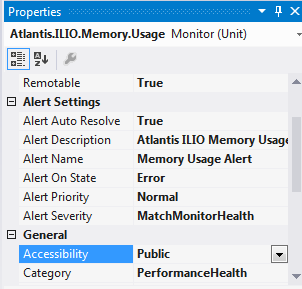
The solutions is to add the required properties as the last lines in the Alert Description field:
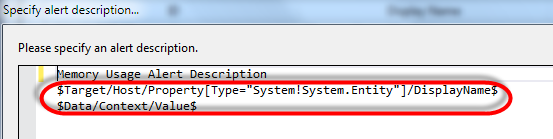
If you look into the generated XML (the .mptg.mpx file) you can see that the Alert Parameters have been added:
xml
Download
!-- This file has been automatically generated.
     Any changes made to this file may be lost the next time it is regenerated. -->
<ManagementPackFragment SchemaVersion="2.0" xmlns:xsd="http://www.w3.org/2001/XMLSchema">
  <Monitoring>
    <Monitors>
      <UnitMonitor ID="Atlantis.ILIO.Memory.Usage" Accessibility="Public" Enabled="true" Target="Atlantis.ILIO.Appliance.Memory" ParentMonitorID="Health!System.Health.PerformanceState" Remotable="true" Priority="Normal" TypeID="SNM!System.NetworkManagement.ThresholdMonitor" ConfirmDelivery="false">
        <Category>PerformanceHealth</Category>
        <AlertSettings AlertMessage="Memory.Usage.AlertMessage">
          <AlertOnState>Error</AlertOnState>
          <AutoResolve>true</AutoResolve>
          <AlertPriority>Normal</AlertPriority>
          <AlertSeverity>MatchMonitorHealth</AlertSeverity>
          <AlertParameters>
            <AlertParameter1>$Target/Host/Property[Type="System!System.Entity"]/DisplayName$</AlertParameter1>
            <AlertParameter2>$Data/Context/Value$</AlertParameter2>
          </AlertParameters>
        </AlertSettings>
        <OperationalStates>
          <OperationalState ID="MTSThresholdSuccess" MonitorTypeStateID="MTSThresholdSuccess" HealthState="Success" />
          <OperationalState ID="MTSThresholdError" MonitorTypeStateID="MTSThresholdError" HealthState="Error" />
        </OperationalStates>