
I have been working with Microsoft’s Desktop App Converter a lot recently. Even though there’s an option to autosign the resulting package with the -Sign switch I prefer to sign APPX packages myself using signtool.
The reason is that I can send UWP packages to testers for sideloading without requiring them to import the auto generated certificate (which is different on each (re)build).
However I always forget the exact path to signtool.exe (this comes with the Windows SDK).
The Windows 10 SDK is installed by default in C:\Program Files (x86)\Windows Kits\10.
Signtool.exe will be in the folder <sdkpath>\bin\\<version>\\<platform>\signtool.exe.
As there are multiple version of Windows 10 there are multiple version of the SDK and you can install those concurrently.
But then I found the PowerShell cmdlet Resolve-Path which “Resolves the wildcard characters in a path, and displays the path contents”.
This does exactly what I need:

Wow, Resolve-Path is a perfect example of the many hidden gems in PowerShell!
So I decided to wrap signtool.exe in a PowerShell cmdlet as PowerShell also makes it easy to locate the correct code signing certificate from the certificate store.
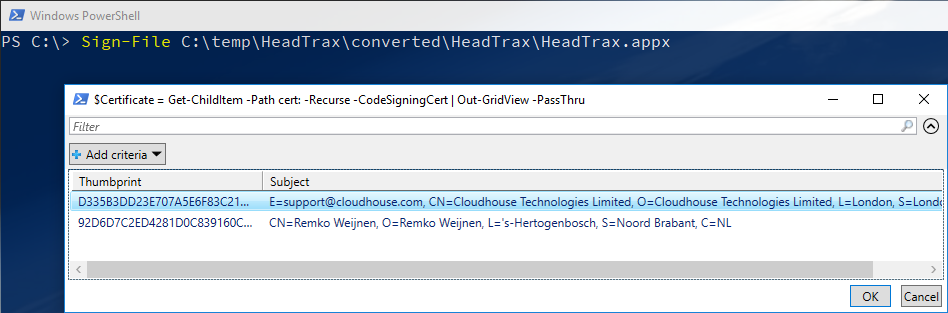
The certificate can either be provided with a parameter but if this is omitted the script will search for code signing certificates in the Personal certificates store.
If multiple code signing certificates are found, the script will ask which one you’d like to use:
function Sign-File {
	<#
	.SYNOPSIS
		Sign a file (e.g. .dll .exe .appx) using signtool (prerequisuite)
	.DESCRIPTION
		Leverages signtool.exe from the Microsoft Windows SDK to sign
		files with a digital signature. Supports Verbose and Debug switches.
	.EXAMPLE
		Sign-File "MyFile.Exe"
	.EXAMPLE
		gci "MyFolder" -Recurse -Filter *.exe | Sign-File
	.NOTES
		Name: Sign-File
		Author: Remko Weijnen
	#>
	[CmdletBinding(SupportsShouldProcess=$True)]
	param
	(
		[Parameter(Mandatory=$True,
		ValueFromPipeline=$True,
		ValueFromPipelineByPropertyName=$True,
		  HelpMessage='Which file(s) do you want to sign?')]
		[Alias('PSPath')]
		[System.IO.FileInfo[]]$FilePath,

		[Parameter(Mandatory=$False,
		ValueFromPipeline=$True,
		ValueFromPipelineByPropertyName=$True,
		  HelpMessage='Which code signing certificate to use')]
		[Alias('Cert')]
		[System.Security.Cryptography.X509Certificates.X509Certificate2]$Certificate
	)

	BEGIN
	{
		Write-Verbose "Signing file(s): $FilePath"

		# find signtool
		$signTool = Resolve-Path  "$([Environment]::GetFolderPath("ProgramFilesX86"))\Windows Kits\*\bin\*\x64\signtool.exe" | Select -First 1

		Write-Verbose "using SignTool location: $signTool"

		if (!$Certificate)
		{
			Write-Verbose "No certificate specified, searching for code signing certificates..."
			$certs = Get-ChildItem -Path cert: -Recurse -CodeSigningCert
			if ($certs -is [array])
			{
				# found multiple code signing certificates, ask the user which one to use
				Write-Verbose "Found multiple code signing certificates, please select one..."
				$Certificate = Get-ChildItem -Path cert: -Recurse -CodeSigningCert | Out-GridView -PassThru
			}
		}

		Write-Verbose "Using certificate $($Certificate.Subject)"
		$psi = New-Object System.Diagnostics.ProcessStartInfo
		$psi.FileName = $signtool.Path

		$psi.RedirectStandardOutput = $true
		$psi.RedirectStandardInput = $true
		$psi.RedirectStandardError = $true
		$psi.UseShellExecute = $false
		$psi.CreateNoWindow = $true

		$results = @()

	}

	PROCESS
	{

		ForEach ($item in $FilePath)
		{
			Write-Verbose "Processing $($item.Fullname)"
			$operation = "sign"

			if ($psBoundParameters['Debug'])
			{
				Write-Verbose "Adding debug switch to SignTool"
				$operation += " /debug"
			}

			$psi.Arguments = @("$operation /fd SHA256 /sha1 $($Certificate.ThumbPrint) /t `"http://timestamp.digicert.com`" `"$($item.Fullname)`"")
			Write-Debug "Signtool commandline: `"$($psi.Filename)`" $($psi.Arguments)"

			if ($PsCmdlet.ShouldProcess($item))
			{

				$stdOut = New-Object System.Text.StringBuilder

				$process = New-Object System.Diagnostics.Process


				$process.StartInfo = $psi
			    try
				{
					$process.Start() | Out-Null

					$result = [PSCustomObject]@{
				        file = $($item.Fullname)
						stdout = $process.StandardOutput.ReadToEnd()
				        ExitCode = $process.ExitCode
						stderr = $process.StandardError.ReadToEnd()
				    }

					$process.WaitForExit()

					Write-Verbose "Signtool output: $($result.stdout)"
					if ($process.ExitCode -ne 0)
					{
						Write-Error $result.stderr
					}

					$results += $result
				}
				catch [System.ComponentModel.Win32Exception]
				{
					Write-Error "Exception launching signtool: $($_.Exception.Message)"
				}
				catch
				{
					Write-Error "Exception: $($_.Exception.Message)"
				}
				finally
				{
					$process.Dispose()
				}
			}
		}
	}
	END
	{
		Write-Verbose "Finished"
		$results
	}
}
The script can be downloaded directly from my Github repo.
